
Shelter Sense release notes
1.2.1-beta
PDF training plans open again, every "contact us" link reaches a real person, new Support and Contact pages, and the groundwork for the Shelter Sense phone app. The phone app is not available yet: you cannot install it, and nothing about how you use Shelter Sense changes today.
Fixes
-
PDF training plans open again. Opening a training plan's PDF failed for every plan, because the check on the file's name refused the dot and file name every uploaded PDF carries. It now refuses only names that try to reach outside the plan's own files, and still checks that the PDF belongs to your organization.
-
"Contact us" reaches a real person. The support, privacy, security and sales addresses on the website, the legal pages, the pricing page, your account page and six of the emails Shelter Sense sends pointed at mailboxes that did not exist, so a message sent to them went nowhere. They all reach a real mailbox now, listed on the new Contact page, and each link fills in a subject saying what it is about (billing, a privacy request, a security report and so on).
Where: The website footer, Terms, Privacy, Pricing, My account, and the invitation, password and billing emails.
New features
- Support and Contact pages. sheltersense.ca/support answers the common questions about signing in, people and permissions, billing and reporting a problem. sheltersense.ca/contact says who to write to for help, pricing or privacy. The footer links to both, in place of the old links that left the site.
- Organization addresses the site already uses are taken. A new organization can no longer pick a web address such as "support", "contact", "invite" or "reset-password", which would have clashed with a page of the site. Existing organizations are not affected.
The phone app (coming, not available yet)
The Shelter Sense phone app is not in the App Store or Google Play yet, and you cannot install it. Nothing in this release asks you to. These notes will say when it is ready, and how to get it.
This release puts in place what the iPhone and Android app will need on our side, so the app can be tested against the real service:
- One account for the web and the phone. The app will sign in with the same email and password you use on the web, through the same sign-in steps, and will show the same messages when a sign-in is refused, a password must be changed, or a subscription has lapsed.
- What it will cover. Floor work: List Mode sign-outs and sign-ins, evaluations, comments, assessments, training plans and animal records, with the same permissions as the web. Reports, billing, users and setup stay on the web.
- Working without a connection. Changes made on the phone will be saved on the phone and sent when it is back online, through the same path the web's offline mode uses, so a change is checked, dated and shared with everyone's screens the same way.
- Formatted text is cleaned before it reaches the phone. Notes, comments, assessments and training plans are cleaned of anything unsafe on our side before they are sent, as the web already does when it shows them.
The web and the phone share one set of rules
List Mode's display rules (Last Out, the care week, sorting, the assessment countdown) and the Sync issues wording now come from one shared place used by the web and the phone, so the two cannot drift apart. We compared the old and new rules over more than 27,000 cases, including daylight-saving days: nothing changes on the web.
Where: Not visible in the app.
1.2.0-beta
A phone menu built for phones, a List Mode that fits the screen, animal pickers you can type into, food and elimination at a glance, "last out" that remembers yesterday, a history for colour codes, your own activity page, faster logins, and no update message on a page that is already up to date.
New features
- Type to find an animal. Every place you pick an animal (adding or editing an evaluation or an enrichment session, a comment, an assessment, a training plan, or a cohort's animals) now has a search box. Type part of a name, an A# or shelter ID, a cohort, a kennel, a breed or an animal type, and the best matches come first. Each row shows the animal's type, location and cohorts, and its A# is the one List Mode shows. A scanner works too: scan an A# and press Enter. If no animal has that number, the box empties instead of keeping the scan.
- Typos forgiven, numbers exact. A small slip in a name still finds the animal. A number has to match: a mistyped A# or kennel number lists nothing, never the animal next door. A shelter ID typed without its dashes or spaces still finds its animal, and pressing Enter on one picks it.
- Every animal, however many you have. The old lists stopped at 500 animals on some screens. The search reaches every active animal, and archived ones where the screen allows them.
- Cohorts stay tidy. A cohort limited to one animal type only offers that type, and "Select all N shown" adds every animal found for what you typed (it stays off until you type something). "Clear" un-picks them all. While you pick or scan several animals, a line under the search box says how many are picked and what the last one did; they appear as chips when you close the list.
Before (1.1.8)
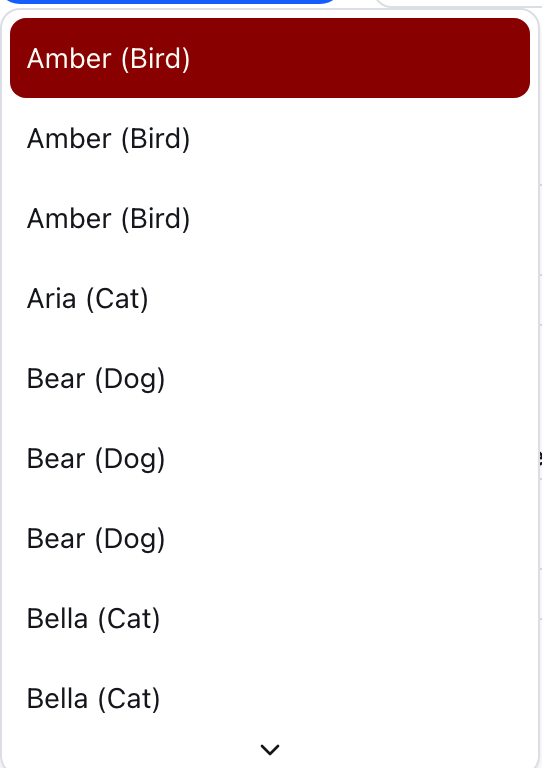
After (1.2.0)
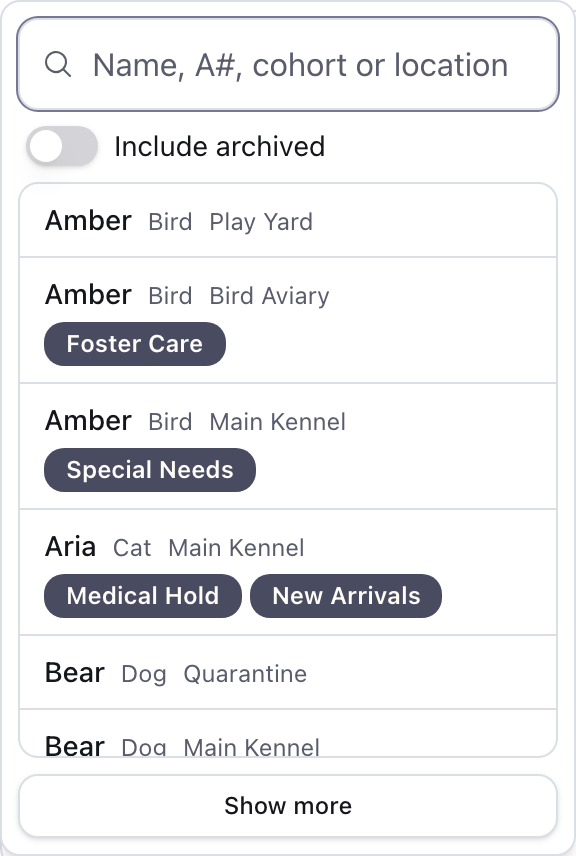
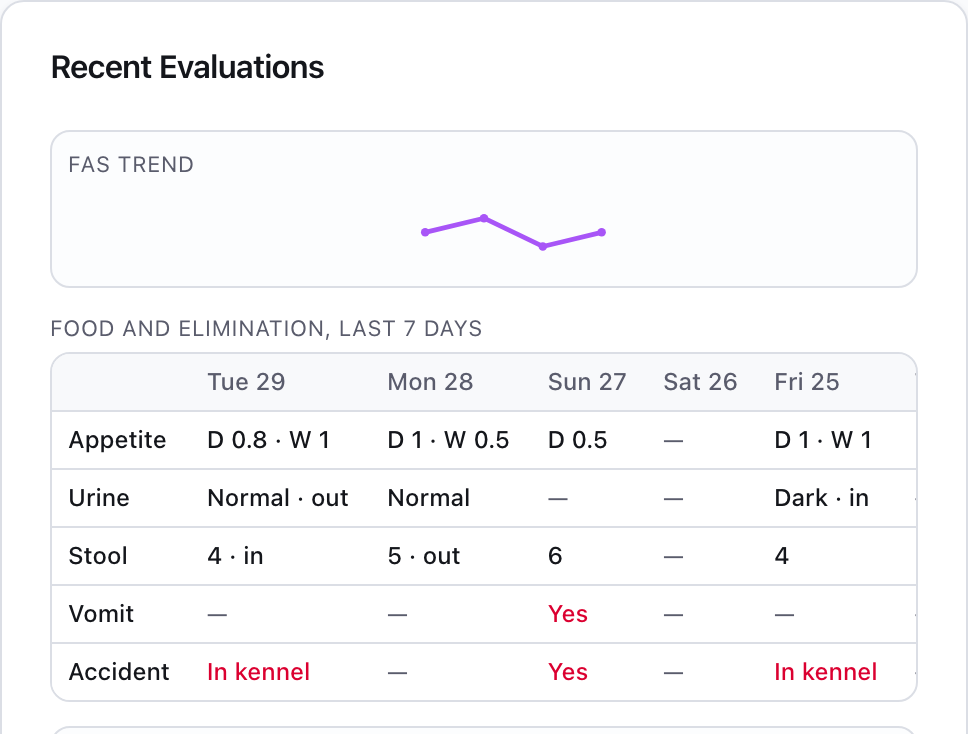
- See it at a glance. An animal's page shows the last seven days of appetite (dry and wet), urine, stool score, vomiting and accidents in one strip. Each evaluation also lists appetite, urine, vomiting and accidents, not just stool. On a List Mode card, "This week" opens the same strip. The Evaluations table and an enrichment session's page show the same details, so a row found with the "Elimination accident" filter says what happened and where.
- Food you can read. Appetite shows as a percentage, such as "Dry 37% · Wet 80%", and the sliders show the number as you set it.
- Where it happened. When you record urine or stool, at sign-in or in any evaluation, you can say where it was found: "In kennel" or "Outside" for dogs, "In litter box" or "Not in litter box" for cats.
- Accidents are worked out for you. Each animal type now has a setting, "Where should this animal eliminate?" (outside for dogs and in the litter box for cats, set for you). Urine or stool found anywhere else counts as an elimination accident, alongside the Inappropriate Elimination tick, in the animal's week, the Evaluations filter, cohort statistics and reports.
- A moved evaluation says so. If an evaluation was moved to another animal, its session page says which animal it belongs to, with a link, and its readings count for that animal.
Before (1.1.8)
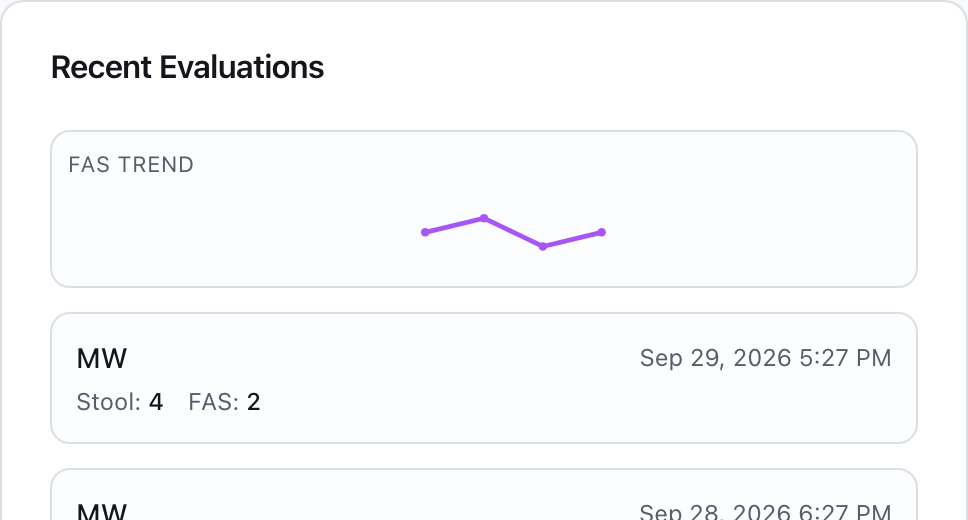
After (1.2.0)
- Yesterday still counts. An animal that has not been out today shows when it was last out, such as "Yesterday 2:05 PM" or "3 days ago", in the summary table and at the top of its card.
- Who has waited longest. A new List Mode sort, "Longest since last out first", puts animals that have never been out at the top, then the longest wait. The list keeps its order while you work, so a card never jumps away as you sign it out; "Re-sort" brings it up to date. The "Order is out of date" notice above the cards stays clear of each card's Options button on a phone, a tablet and a computer.
Before (1.1.8)
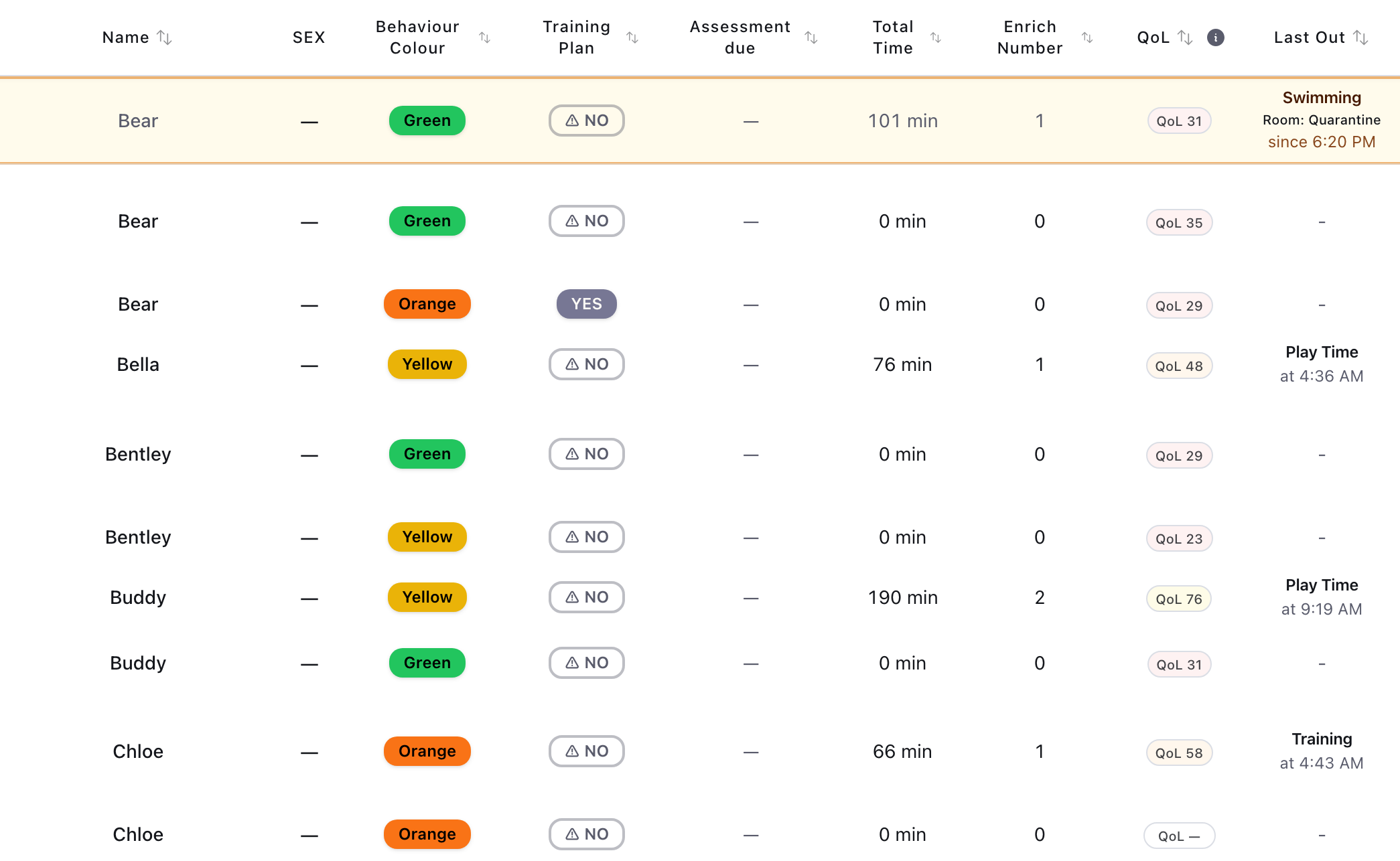
After (1.2.0)
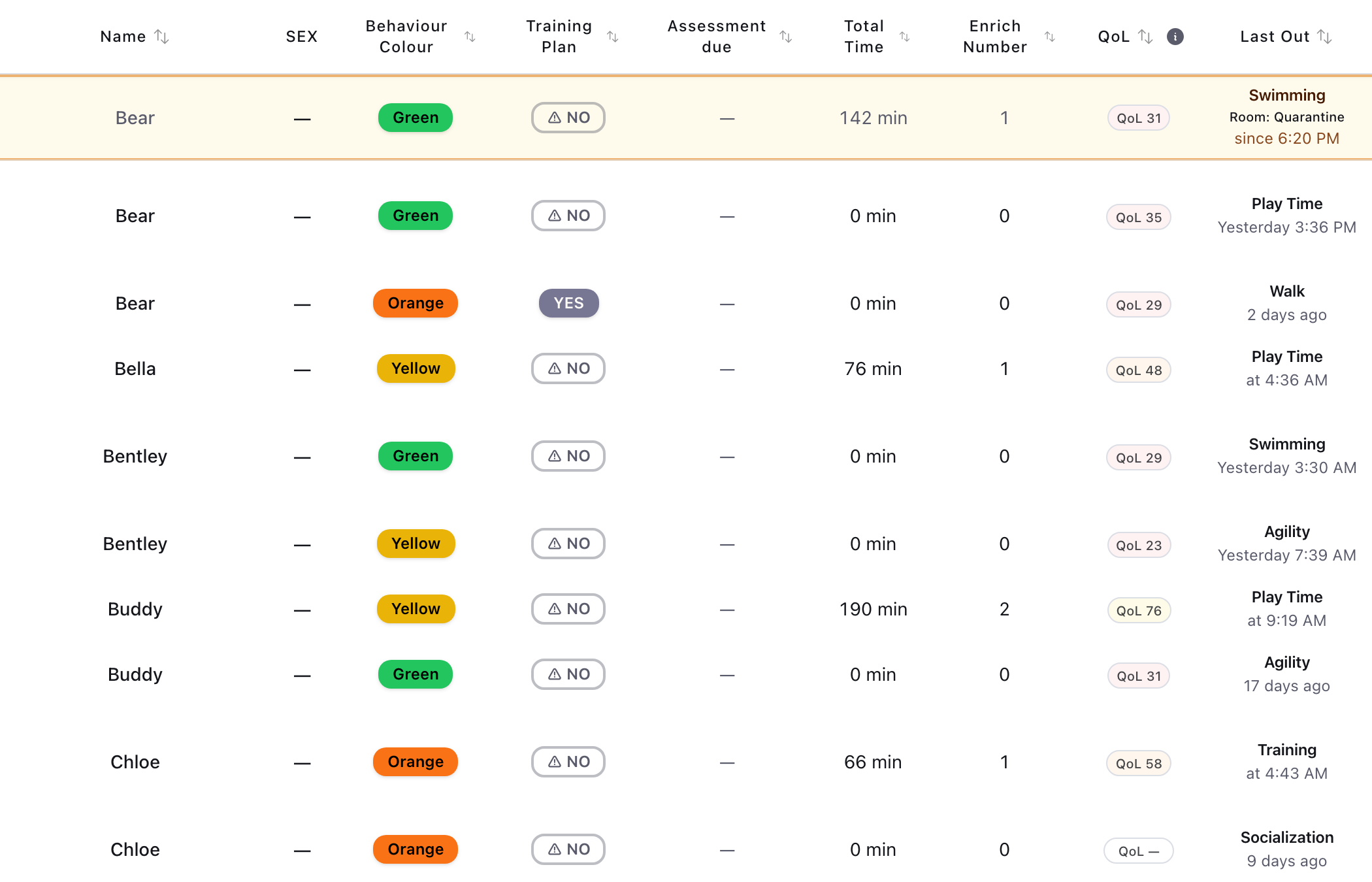
- Colour-code history. Next to an animal's colour code, a history button lists every change: the colour, when, and who made it. History starts with this version.
- Who did it. Signing an animal out and in, recording an evaluation and writing a comment now remember which account did it, starting with this version.
Before (1.1.8)
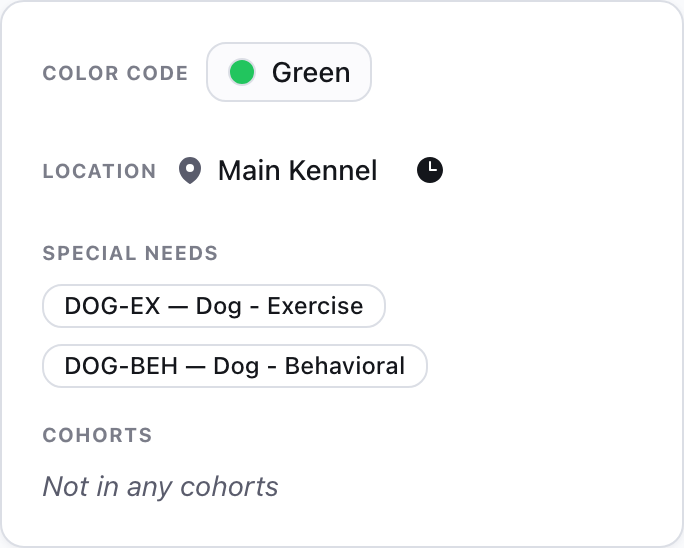
After (1.2.0)
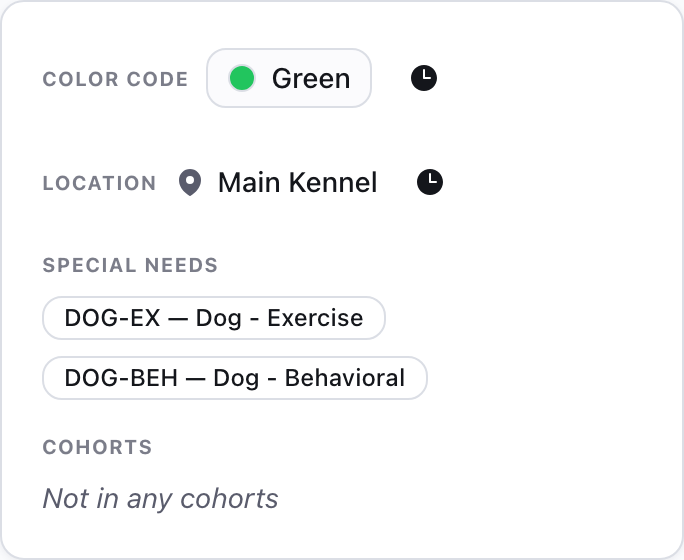
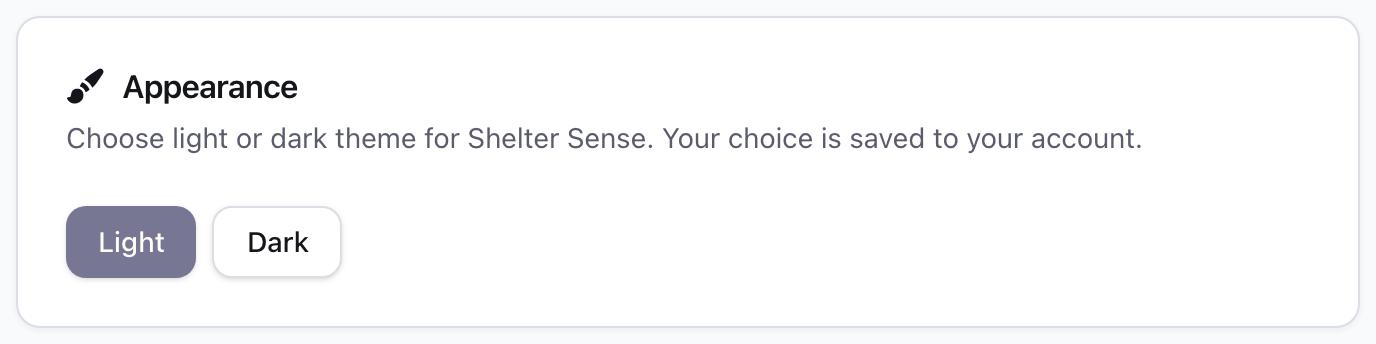
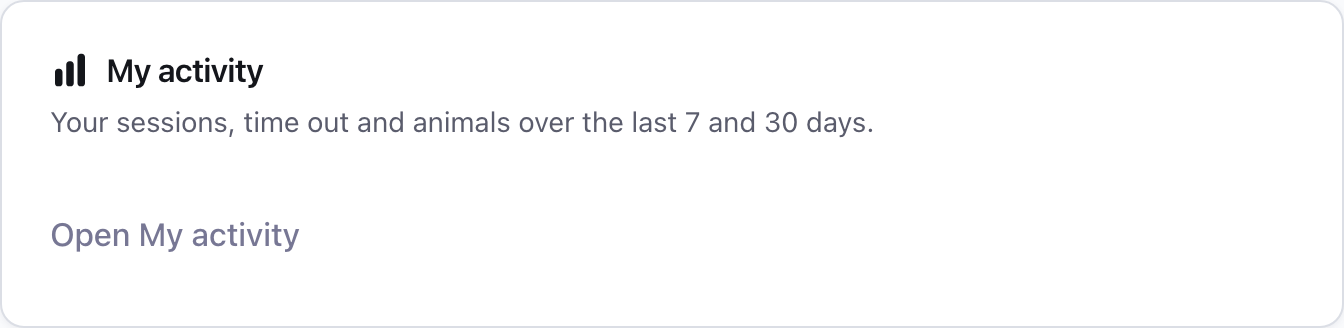
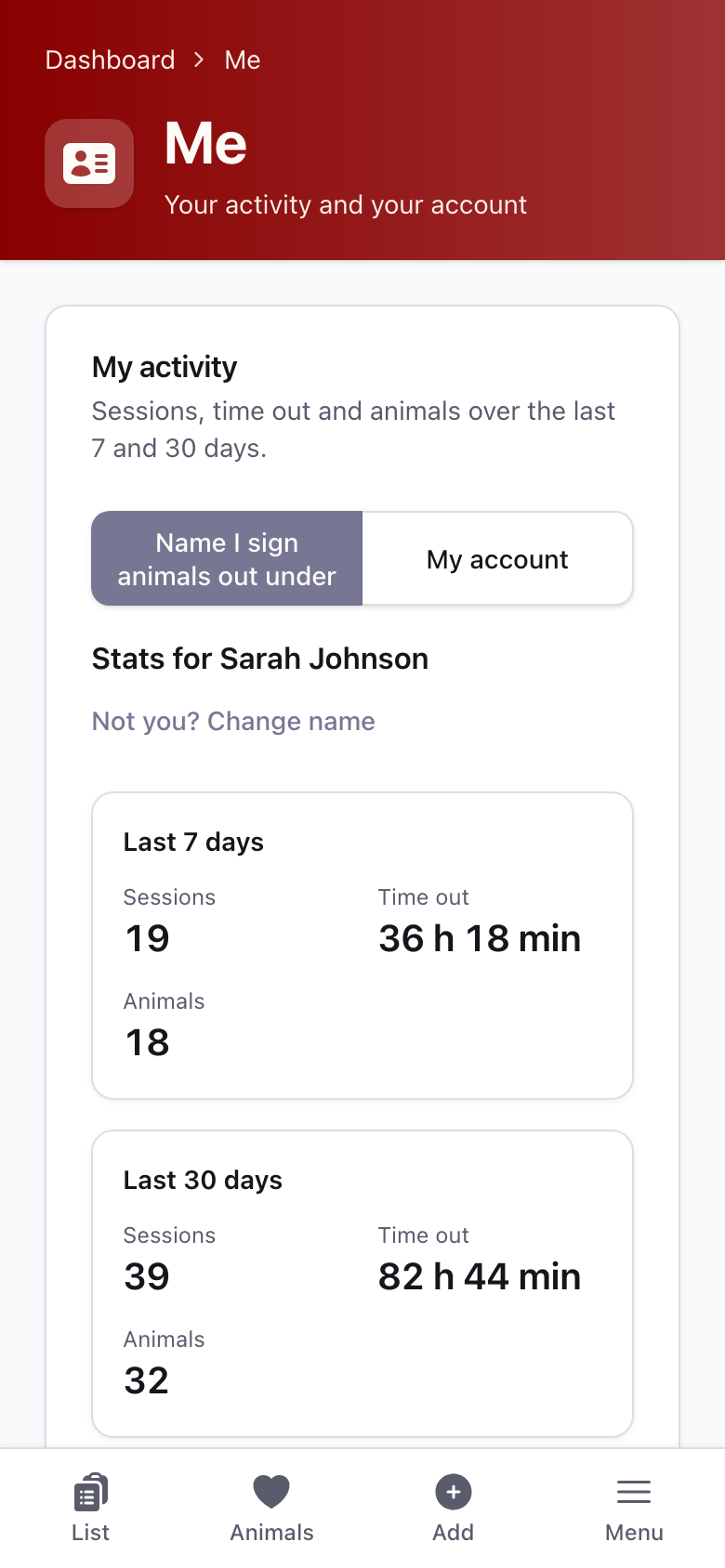
- Your activity. A new "Me" page shows your sessions, time out and animals for the last 7 and 30 days, counted by the name you sign animals out under (it asks once and remembers it on that device), with the evaluations signed with that name. "My account" counts by your own login from this version on, and adds every evaluation and comment that login recorded. Your profile, appearance and account links sit on the same page. On a phone, open "Me" from the bottom bar, or from Menu if your bar shows Add; on a tablet or computer, open "My activity" from Account settings.
Before (1.1.8)
After (1.2.0)
Improvements on a phone
- Name and Last Out side by side on List Mode. On a phone the summary table keeps the animal's name fixed at the left edge while you scroll sideways, and until you choose your own column order it shows only Name, Last Out, Total Time and Actions (plus the column you are sorting by), so you can see who was out last without scrolling. The other columns come back on a larger screen or once you edit the order.
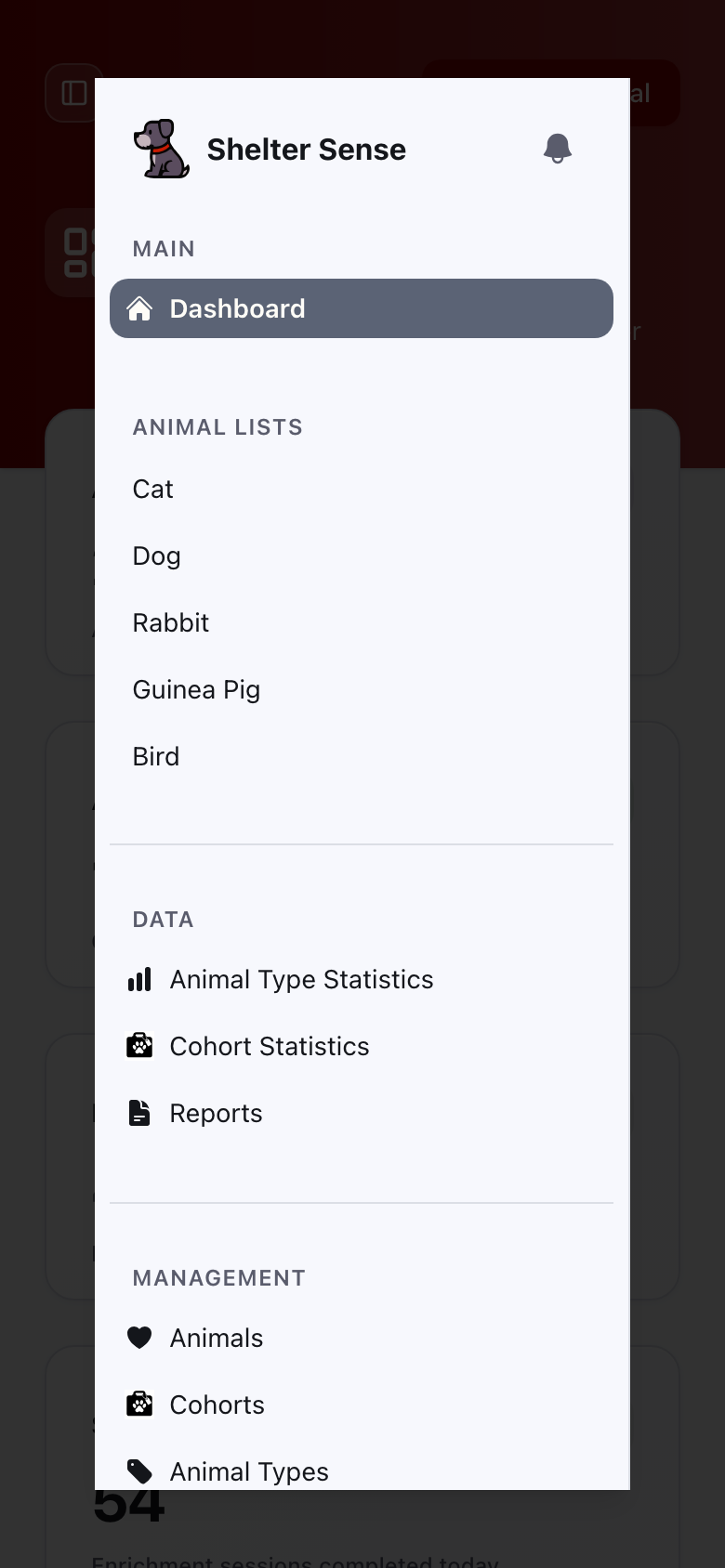
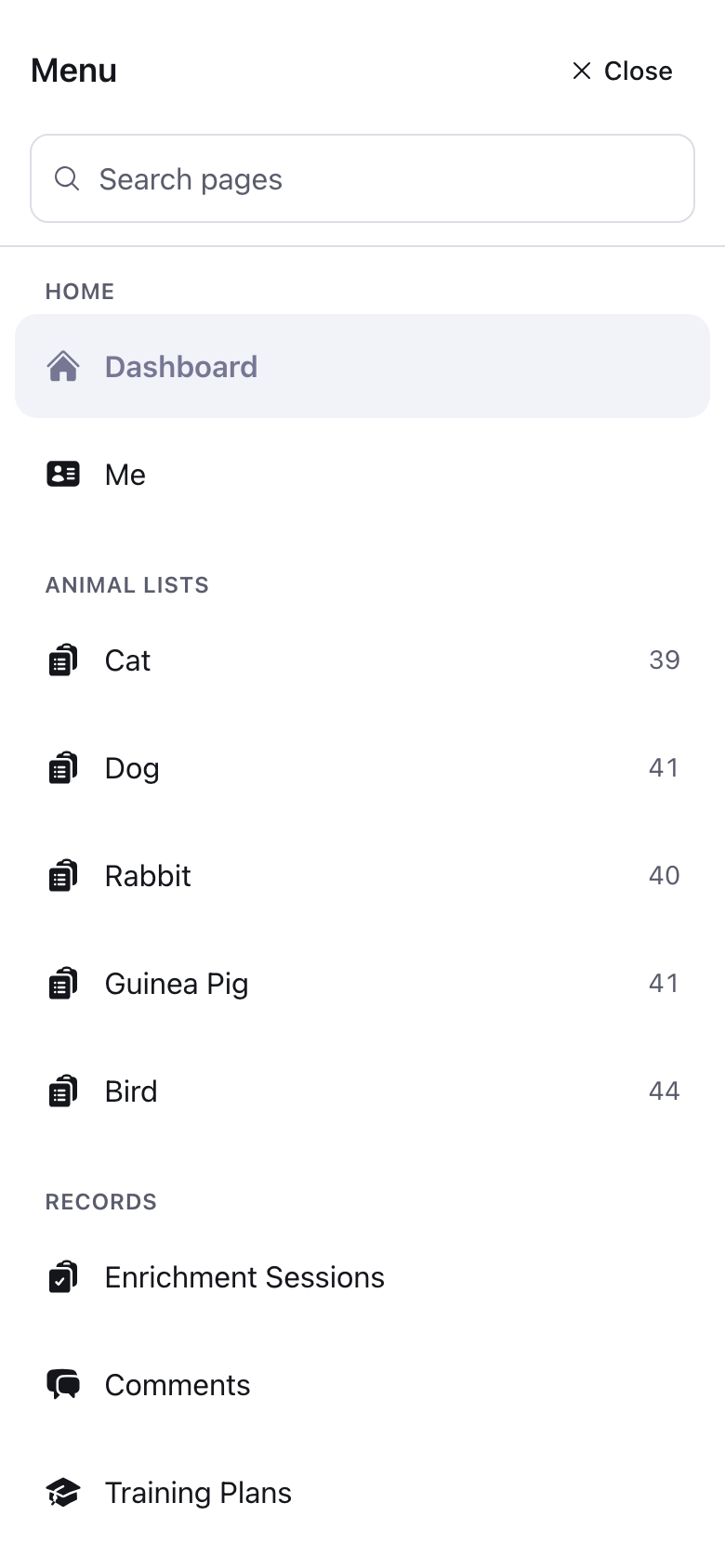
- A menu made for phones. A bar along the bottom of the screen holds List, Animals, Add (or Me) and Menu, always within reach of your thumb. Menu opens a full-screen page with every other screen, grouped and searchable, including notifications, release notes, feedback and log out. List opens "Choose a list", one large row per animal type with how many active animals it has, and Add asks which type of animal you are adding. Tablets and computers keep the menu they had.
Before (1.1.8)

After (1.2.0)

Before (1.1.8)
After (1.2.0)
- List Mode fits the screen. The four stat tiles are now one line. Each card shows a red Sign out or Sign in button and opens its form only when you tap it; the button then reads Close and folds the form away again. A column with nothing in it for any animal, such as Sex when no sex is recorded, is not drawn.
Before (1.1.8)
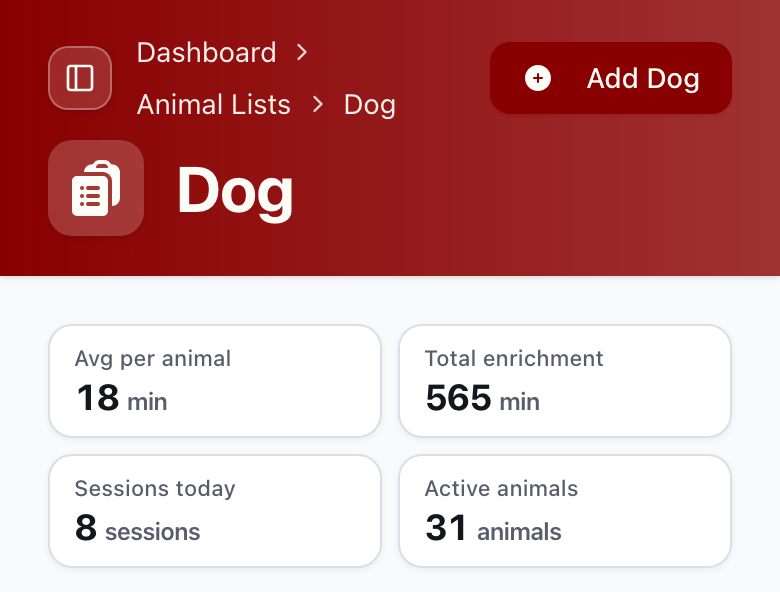
After (1.2.0)
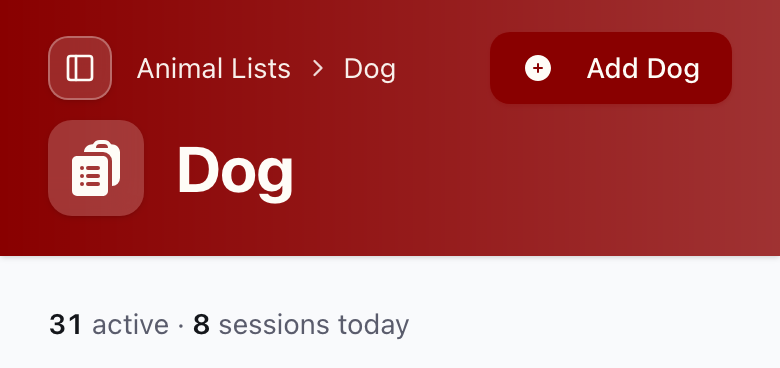
Before (1.1.8)
After (1.2.0)
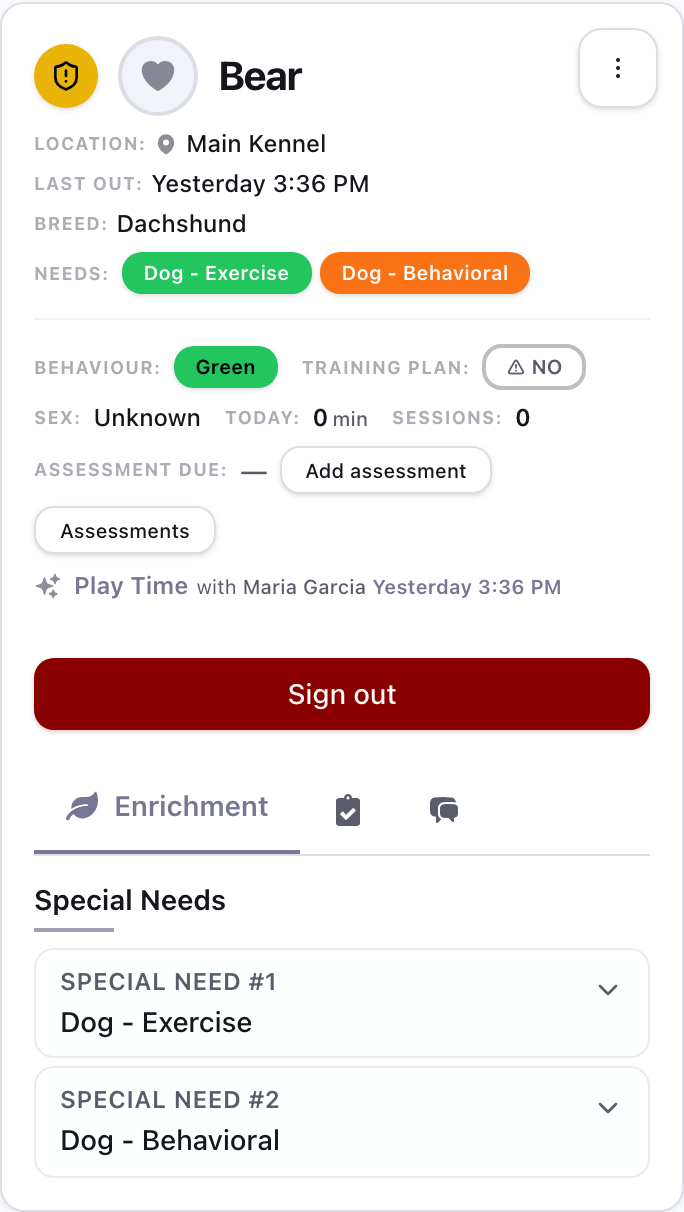
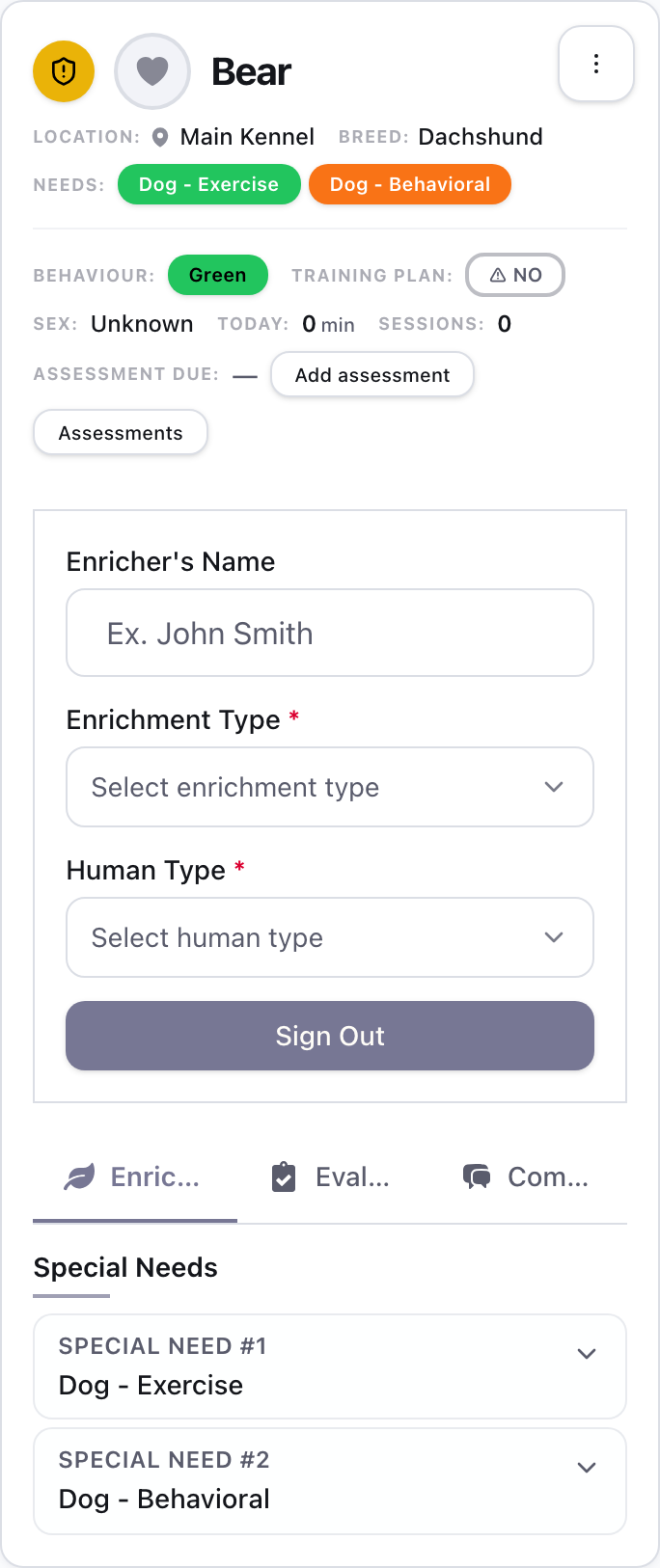
- Tabs you can read. Card tabs are icons with the open tab's name beside them, instead of "Enric… / Eval… / Com…".
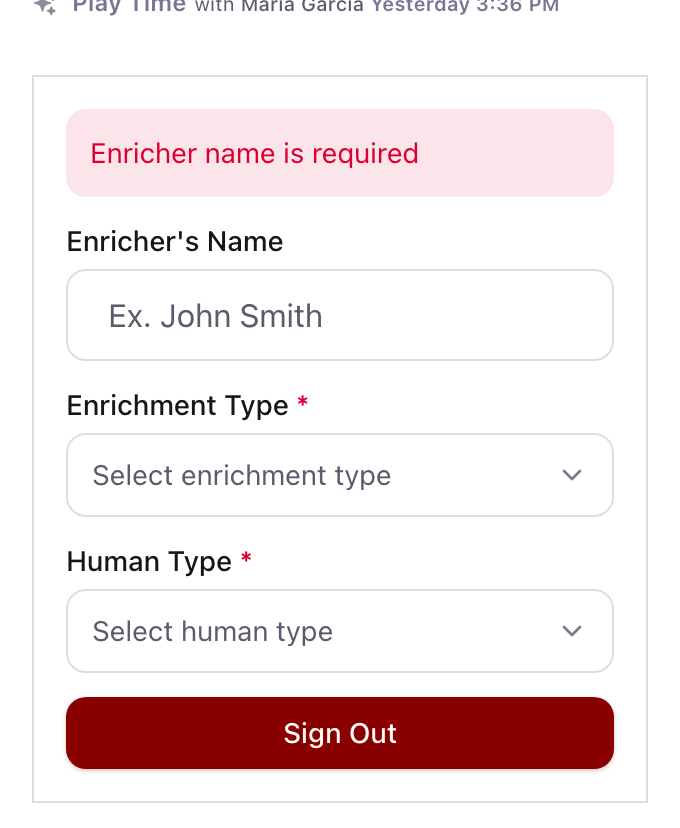
- Forms say what is missing. Signing out without an enrichment type now says so on every phone, instead of a button that seems to do nothing. The same goes for Sign in, Add Animal and Quick Edit. When Add Animal is refused, the reason is beside the Create button, where you are looking, whether you are online, offline or signed out, and a refusal that repeats is announced again. A missing name puts the cursor in the Name box. A refused sign-out or sign-in also shows its reason beside the button, once, and on a phone the screen stays on that animal's card. What you typed stays in a form after a save is refused.
Before (1.1.8)
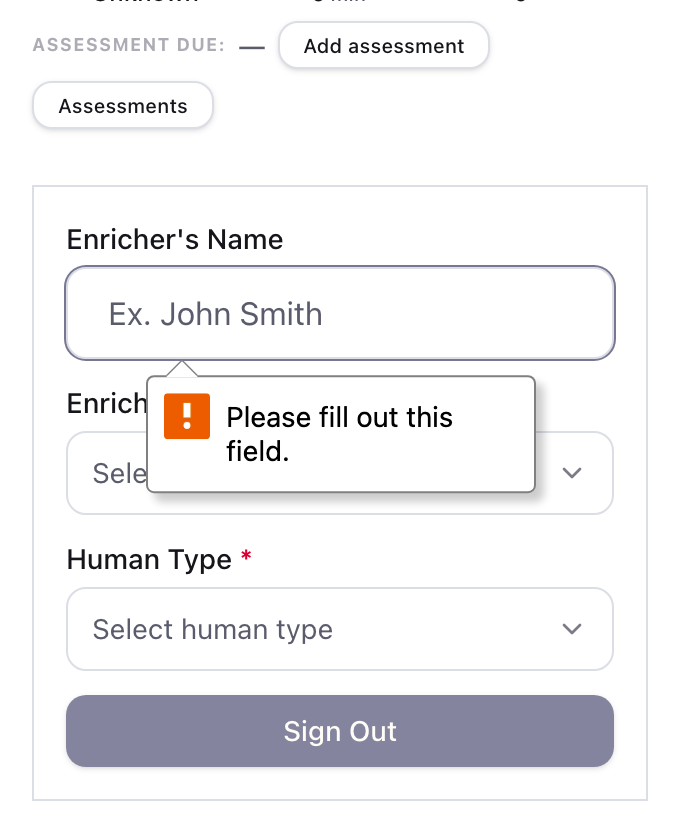
After (1.2.0)
- Tables that tell you they scroll. Management tables show "Swipe for more" above the table while there is more to the right, and simpler page controls on a phone.
- Tidier screens. A shorter assessment toolbar, a dashboard with two stat cards per row, an animal page that states each fact once, and the right theme button highlighted in Appearance. The Animals filters sit two to a row, an empty table's message wraps inside the screen, an animal type with no picture shows a paw print, and search boxes show their magnifier again. Buttons and messages at the bottom of the screen sit above the new bar instead of under it.
- Feedback when it makes sense. The "How is your experience?" question now comes after you finish a sign-out or sign-in, never the moment a page opens.
UI improvements
- "No plan" instead of "NO". An animal without a training plan now shows a plain "No plan" badge with no warning sign, so the animals that need attention stand out from the ones that simply have no plan.
- Choose what an animal with no colour code shows. On an animal type's page, the List Mode summary table card has a new "When an animal has no colour code" setting: pick the label and colour List Mode draws (for example a black "Unrated"), or leave the label empty to show nothing. Animal types you do not change still show "None".
- Group List Mode by location. The same card has a "Group by location" option. When List Mode is sorted by location, each room gets its own shaded band on the rows and the cards, so seventy cats in one list can be told apart by room. Within a room the animals stay in name order, and rooms with the same room number (or none) now sort by room name, so one room's animals no longer mix with another's.
- Buttons that look like buttons. The button that saves, sends or applies a form is now red on every screen, so it no longer looks greyed out. A chosen answer, such as a Behavior Score or one side of a two-way switch on the Census report or the activity calendar, is filled in solid, so it no longer looks like the one that is switched off.
- Readable sign-in form. The labels on List Mode's Sign in form are now dark enough to read in the light theme.
- Animal types are listed by name. Everywhere animal types appear, including the Reports benchmark card and the census snapshot, they are now in alphabetical order, so the order you see may change once.
- Page changes start at the top. Moving to another page of a long table shows the top of the new rows, and Back returns you to where you were, even after you reload the page.
- Less jumping while List Mode loads. The stats line, summary table and comments keep their space while they load, and another cause of the page flashing back to grey placeholders is gone.
- "Saved." stays out of the way. On an animal type's sign-in options, the "Saved." note sits beside Save instead of pushing the button down, and goes at your next edit.
Speed and privacy
- Logging in is quicker. Checking your password no longer holds up the server.
- No outside analytics. Shelter Sense no longer loads a third-party analytics script. The little it measured is now counted by Shelter Sense itself, without names or email addresses.
Bug fixes
- A colleague's new comment appears without a reload. A comment someone else adds, edits or deletes now shows up in the Comments tab you have open within a few seconds. Tabs for other animals are left alone.
- Evaluations save again. An evaluation whose weight, appetite or behaviour assessment was stored with more decimals than the edit form allowed could not be saved after any change. It now saves, and a refused save no longer puts the old stool score back over the one you typed.
- "None" means none. Writing "none", "no", "n/a", "NA" or "-" in the vomit box no longer counts as vomiting in the animal's week, the Evaluations filter, reports or cohort counts.
- A note of "nothing found" shows as "none". A urine note such as "NA" or "n/a" now reads "none" on the animal's week, the session page and the medical report.
- Quality-of-life scores no longer count "NA", "-", "no" or "none" as a urine problem. Scores are worked out when you open them, so some past days now score higher than before.
- No duplicate animals. If the connection drops just as you add an animal, Shelter Sense tells you it was saved, with a link to view it, instead of showing an empty form, and saving again cannot create a second copy. The Create button also works again straight away after a dropped connection, instead of staying dead until you reload.
- One A# per animal. Adding or editing an animal with a Shelter Animal ID (A#) that another animal already holds is refused, and the message names that animal.
- A new colour code or location is picked. Creating one from inside Add Animal now selects it, and the dialog no longer saves the whole Add Animal form behind it.
- Empty means empty. A comment, training plan, assessment or animal note that you typed in and then emptied no longer saves as blank, and an emptied one can no longer wipe a training plan or assessment that was already stored.
- The right time in a dialog. Create Evaluation, Create Session and Place off site start from the time or day you opened the dialog, not from when the page was loaded.
- The right field gets the cursor. Tapping a label in a List Mode card used to put the cursor in the first card's field. It now goes to the card you tapped.
- Cancel means cancel. Pressing Cancel in a dialog such as Add Comment, Edit Location, Edit User Roles or Place off site used to keep what you had typed or ticked, and show it again the next time the dialog opened. Cancel now discards it, the same as closing with the X.
- Nothing lost in folded sections. On the List Mode evaluation form and the statistics filters, whatever you entered in a section you then folded away is now saved or applied, instead of quietly dropped.
- Statistics show everything until you narrow them. Choosing a quick date range or removing a filter chip no longer switches on every other filter, which used to hide sessions with no colour code, location or human type. The date boxes and ticks now follow what you chose, so Apply no longer brings the old filter back.
- A refused date range says so. The animal-type statistics page shows no Export CSV for a range it refused, and the cohort statistics header names its dates only when that range is applied.
- Quick-added animals appear straight away. Animals you quick-add while creating a cohort are in the lists and the search even when the cohort itself is refused, for example for a name that is already taken.
- Names with _ or %. A location, cohort or other name containing "_" or "%" is no longer mistaken for a different name when checking for duplicates, and searching for those characters finds only what you typed.
- Names keep the case you typed. Saving an enrichment type or an animal type, even unchanged, used to turn its name (and an animal type's plural) into lower case everywhere, and a changed enrichment type name cut it off from its past sessions. Names now stay as typed, a name that differs only in case from an existing one is refused as a duplicate, and changing only the case of an enrichment type re-spells its past sessions too. The names on the Human Types page keep the case you typed as well.
- Enrichment Types counts sessions per animal type. A session of one animal type no longer counts under a same-named enrichment type of another.
- A comment with nobody to see it is refused. Turning "Public comment" off without ticking a role used to save the comment as public. It now asks you to pick who can see it, in the web app and when a comment waiting offline is sent. On List Mode's Sign in form, someone with no role assigned cannot tick "Limit comment visibility": the form says why, and the comment is public.
- Add Session and Add Evaluation refuse the future. A session or evaluation timed more than a few minutes from now is refused, when you add it and when you change its time, so List Mode no longer shows an animal's last outing as a time that has not happened.
- Location, Colour Code and Enrichment Type are picked, not typed. Add and Edit Session offer the values that exist, with "No colour code" and "Unassigned" where they apply, instead of saving whatever was typed. Until you pick an animal, one line under the animal picker says the three lists wait for it, and an animal type with no enrichment types set up says so under a greyed-out Enrichment Type list.
- The census report adds up. "Population at start" is the population when the period opens, so start + intakes - outcomes equals the end, and the summary's highest and lowest populations include it. In the CSV export, "Population at start" and "Net change" now begin from that opening population, so their values differ from before. The CSV's "In care (peak)" column is now "In care (end-of-day peak)", to set it apart from the summary's peak, which counts the opening too.
- One day, not "1 days". Reports say "1 day" and "1 stay", the census tiles say "1 arrival in this period" and "1 departure in this period", List Mode's summary says "1 session" and "1 animal", a screen reader hears "1 unread notification" on the bell, and a super admin's Beta tab says the "How is your experience?" question comes "Every 1 day".
- Reports name the animals they found. A report heading counts only the animals the report found and keeps their own capital letters, a report link whose animals no longer exist says "No animals found", and the browser tab names the report instead of saying "Reports". The medical report's daily dates no longer say "UTC", and its daily urine and stool table keeps a row for each animal, even two that share a name.
- Animal type statistics has a header. The page names the animal type you are looking at, in the page and in the browser tab.
- Browser tabs name what you are looking at. The tab shows the animal's name on its page, the cohort's name on its page, the animal and enrichment type on a session, and "Manage Dogs" or "Add Dog" on those pages, instead of a general title such as "Animal Details" or "Cohort".
- A missing animal or cohort shows the normal "not found" page. A link to one that no longer exists used to show a bare "Not Found". It now shows Shelter Sense's own page with a way back, and the browser tab says "Page not found".
- You only see the links your role can open. A volunteer who clicked User Management used to get "Something went wrong". Links to pages your role cannot open are now left out of the sidebar, the phone menu and bottom bar, the animal type cards on the dashboard and Animal Lists, a type's Manage page and an animal's page, including every List Mode link for a role that cannot see animals. Billing and Global Settings show only to a role that can view them. Create and Delete Animal Type show only to a role allowed to use them, and an Add Animal link opened without permission to add animals says so instead of showing an empty form.
- Losing access no longer leaves a page loading. If you are removed from an organization, its subscription lapses or your login runs out while you have it open, your next click takes you to the Access Denied page, the billing page or the login page, instead of an error or a page that never finishes loading. A history list opened after your login ran out takes you to the login page too, and back to the animal once you sign in, instead of an error in the dialog.
- A link opened while signed out comes back after you sign in. Opening a bookmark or a shared link to an animal, a report or any other page while signed out used to land you on the dashboard after you signed in. It now takes you to the page you opened, with its filters.
- Special needs in priority order. A List Mode card numbers an animal's special needs by priority, so "Special Need #1" is the most urgent one.
- Finding an A# by its digits. Typing more of an A# keeps the match: "345" and "12345" both find A-12 345.
- One accident, one badge. A single elimination accident shows as one badge that says where, not as "Accident" and "Accident: in kennel".
- Accepting a request to join gives a role. The person gets the organization's Default role instead of no role. The confirmation names the organization in plain sentences and no longer says "tenant", and the Access Denied page has a tab title. Someone who already belongs is told "You already have access" with a link to it, instead of sending another request, and someone who was removed can ask again: their request now reaches the administrators, where it used to say they already had access.
- Cancelling an invitation asks first. The X beside a pending invitation is named "Cancel invitation to" followed by the email address, for screen readers, and asks you to confirm before it cancels. Other buttons that show only an icon now have names as well.
- Messages say "organization", never "tenant". The Add and Edit Comment dialogs say a public comment is visible to everyone in your organization. A dialog whose animal, human type or evaluation was removed while it was open now says "Animal not found", "Human type not found" or "Evaluation not found" instead of "does not belong to tenant". An Enrichment Session ID that is not one of the animal's sessions is refused with "Enrichment session not found for this animal".
- The keyboard goes back where you were. Closing a create or edit form, a confirmation, Archive, Place off site or the sidebar on a tablet, with Escape, Cancel, the X or by saving, puts the keyboard focus back on the button that opened it instead of at the top of the page. After a delete it moves to the next row. Screen readers also find one main region on each page instead of two.
- "What's new" stays readable on hover. The button on the login page no longer turns black on red.
- The impersonation banner reads correctly. When a super admin is impersonating someone, the banner now says "You are impersonating" followed by that person's name, instead of starting with the admin's own name.
Offline and updates
- No update message when the page is already up to date. Some computers kept showing "Update available" and "Updating Shelter Sense" on every page, even though the page was already running the new version. A page that is up to date no longer shows them. This holds with Shelter Sense open in several tabs too: when one tab clears a stuck update, the others reload themselves once so the update can finish, as soon as nothing you typed is unsaved.
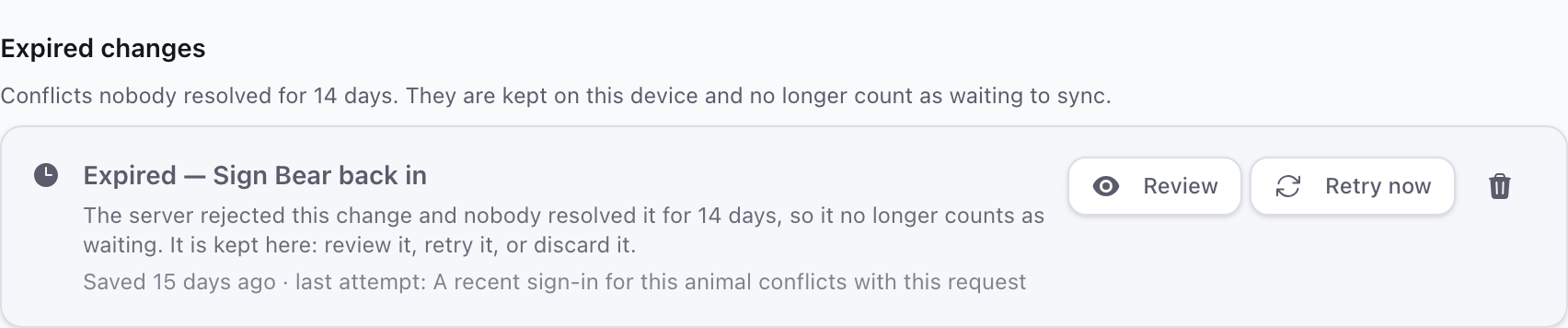
- Old offline conflicts tidy themselves. A change that could not be applied is kept for 14 days, then moved to "Expired changes" on the Sync issues page. Nothing is deleted: you can still review, retry or discard it, and the status badge keeps a link to it.
Before (1.1.8)

After (1.2.0)
- Quieter background refreshes. Pages retry a failed background refresh, and an expired login goes straight to the login page. A short outage of the login service no longer logs you out.
Updates that hand over cleanly
When a new version takes over a page quietly, the page you are on is saved for offline use at that moment, so it still opens without a connection. Error reports are sent before the app reloads itself for an update, so a problem just before a reload is no longer lost.
Where: Not visible in the app, apart from the page you are on still opening offline after an update.
Behind the scenes
- A service that restarts while the password and settings service is still starting now keeps trying and recovers on its own, and idle connections are no longer dropped by the network in front of the app, so fewer pages fail to refresh. Login timing was also measured, and an evaluations lookup was sped up.
For administrators
Database updates that do not hold up the shelter
A new version sometimes has to add an index to a busy table. That used to make every save to the table wait until the index was built. Indexes are now built without blocking saves, the release checks afterwards that none was left half-built and stops with the fix in its message if one was, and a check before each release refuses a database change that would lock a busy table or break the version still running.
Where: Not visible in the app. It means a release during the day does not freeze sign-outs.
More mistakes caught before a release
This version adds dozens of automatic checks that run before every release. Each one guards a kind of mistake found while building it: a page that flashes back to placeholders, a form that loses what you typed, a button hidden under the phone bar, text that cannot be read in the dark theme, an animal missing from the search after a save. A release that fails any of them does not go out.
Where: Not visible in the app. It means fewer fixes that come back.
Libraries brought up to date
The building blocks Shelter Sense is made from (the web framework, the build tools, the server framework and the error-reporting library) moved to their current versions.
Where: Not visible in the app.
1.1.8-beta
Special-need badges that always show something meaningful, a location history for every animal, a List Mode table that shows every column on a phone, an end to List Mode loading twice, and a follow-up to the update fix in 1.1.6-beta for the devices it did not reach.
Special-need badges
- No more question marks. In the List Mode summary, a special need with no icon of its own used to show a bold "?", which read as "unknown". Each badge now shows the need's own icon; if it has none, the icon of one of its behaviours; and if there is no icon at all, its short name (such as CAT-MED) in the need's colour. The text switches between light and dark so it stays readable on any colour, in both themes. A need whose icon differs from its behaviour's icon now shows its own.
- The most urgent needs come first. The STATUS column shows an animal's three highest-priority special needs, then a "+2"-style badge for the rest. Hover or focus it to see the hidden needs by name. Clicking it still jumps to the animal's card, like clicking any other badge.
- No more stray stars. Animal cards and the animal page used to put a star in front of special needs whose icon nobody had chosen. They now show the need's own icon when it has one, and just its name when it does not.
Location history
- See where an animal has been. An animal's page now has a small history button next to its location. It opens a list of every room the animal has been in, the current room first, with when the animal moved in and out. A room that has been renamed shows under its current name. Staff asked for this so they can tell when an animal's room last changed.
Fixes
- List Mode loads once, not twice. The page used to fill in, then turn back into grey placeholders and jump to the top, then fill in again. Anything that changed around the page while it was still loading (the theme settling, the sidebar noticing a narrow screen, the header finishing) made the browser throw away what it had already shown. Those parts of the page no longer disturb it, and every page now guards against this in testing. It was most visible on phones and tablets, and on a desktop with the developer tools open. If you sorted the table or the page had been saved for a different web address, the same thing could happen; that is fixed too.
- The loading placeholders match the page. While List Mode loads, the grey placeholders now sit exactly where the stats, table and cards will appear, so the page no longer shifts when the real content arrives.
- Devices that would not switch to a new version now switch. Some Windows tablets and laptops kept an old version running even after Shelter Sense asked them to switch several times. When that happens, the app now clears its cached copy and reloads onto the new version on its own, the moment nothing you have typed would be lost. It only does this while connected, so a device that is offline keeps what it has.
- The List Mode table shows every column on a phone. The summary table used to hide all but Name, Location and Status on a phone, with no way to reach the rest, so columns you had chosen to show were simply missing. Every column is now in the table, Name first, and you swipe sideways to reach the others.
- Comments load in one request instead of many. Opening List Mode for a shelter with a couple of hundred animals used to ask the database for comments about a dozen times at once, more than it can serve together, so the page could slow down or fail. One request now covers up to 500 animals.
- A closed offline store reopens itself. If the browser closed Shelter Sense's offline storage on a device, the next action could fail with no way back. The app now reopens it on its own, and these closures are no longer counted as errors in the error reports.
1.1.7-beta
List Mode on a tablet or phone now feels quicker, and jumping to an animal lands where you expect.
List Mode feels faster
- Cards off the screen no longer cost anything to keep. The browser now skips drawing animal cards that are scrolled out of view until they are about to appear, so a long list responds to taps sooner and scrolls more smoothly on older tablets.
- Cards keep their size while they load. A card that is still loading its details now holds the same height as the finished card, so the list no longer shifts under your finger as cards fill in.
- Jumping to an animal snaps straight there. Tapping a name or a row in the summary table now goes directly to that animal's card instead of scrolling down past every card in between, and the card stays put while its neighbours finish loading. The "back to top" button snaps too. Both changes were asked for by shelters using the list on the floor.
1.1.6-beta
A short release that closes the last few rough edges the error reports were still showing after 1.1.5-beta: a billing page that answered volunteers with an error, an update prompt that could give up on a slow tablet, and signed-out tabs that kept asking the server for live updates.
Fixes
- Billing is only offered to those who can change it. Members without billing permission now see a note asking them to contact an organization administrator instead of a "Manage Subscription" button that could only fail. The same applies to the receipts button and to the page shown when a subscription has lapsed.
- Updates keep trying. When a new version is ready but a slow device does not switch to it within a few seconds, Shelter Sense now asks again twice, including a fresh check for the update, before it gives up on that attempt. Before, one slow switch could leave a device on the old version until the next day.
- Signed-out tabs take you to the login page. When a session runs out, the "Your session has expired" notice now counts down and opens the login page on its own after ten seconds, with your place kept so you land back where you were. A tablet with no connection stays where it is so nothing queued offline is lost.
- Expected refusals no longer look like faults. Messages such as "Animals with census history cannot be permanently deleted" or "You do not have permission to update billing" are shown as before but are no longer treated as errors behind the scenes, which keeps the error reports focused on real problems.
1.1.5-beta
Screens could quietly go out of date. The List Mode summary, the animal cards and the settings tables kept whatever they were handed when the page opened, so a change made on another tablet — or a moment earlier on this one — only showed up after a manual reload. This release makes them keep up on their own, makes sure only the Shelter Sense server can change what every tablet's live view shows, and finishes the error-reporting work started in 1.1.1-beta. It also gives the occasional "How is your experience?" prompt two clearer questions.
More reliable updates and saves
- The update prompt waits for the new version to finish activating, including on mobile. A slow update stays retryable, and later updates get their own dismissible notice. Canceling a leave-page confirmation keeps the update button usable, even if the version check is temporarily unavailable. If a slow update finishes after you have started typing again, it waits until you are done instead of reloading over your work.
- Automatic updates wait for unsaved form edits and saves in progress. A form counts as unsaved until its save succeeds, so a failed save keeps its protection. Page navigation and search filters no longer keep an idle tablet from updating.
- A sign-out whose response is interrupted no longer restores an older session on other devices. Cards also recover from a held live update without waiting for another animal to change.
- A connection that drops while a page is still loading retries the page in place instead of showing the full-screen error. Archiving or deleting an animal with no connection now says you appear to be offline, instead of a generic error.
- Interrupted offline sync attempts wake themselves up again. Turning offline mode off stops new changes from being queued and clears that organization’s cached pages while keeping other organizations’ offline access and previously queued work.
- Live notifications no longer hold ordinary saves open. Missed animal updates, including ones cut short when our server restarts during an update, are recorded for automatic repair using the latest saved data. A repair that overlaps a newer session change retries instead of restoring the older session. One rejected update no longer blocks repairs for other animals or organizations. A repair is no longer lost when another change lands at the same moment. A missed update is repaired within about a minute, or, if the connection is still down then, within about fifteen minutes of it coming back. A late update can no longer bring back the details of an archived animal.
Screens that keep themselves up to date
List Mode summaries update while you work
The enrichment totals and Quality of Life scores at the top of List Mode were worked out once, while the page was being built, and then left alone. Recording an enrichment session or an evaluation changed the animal's card but not the totals above it, so the two halves of the same page disagreed until you reloaded.
Those numbers now refresh after a change, including a change somebody else made on another device. They also refresh when the device reconnects, when you come back to the tab, and once a minute as a fallback, so a signal that never arrived cannot leave a stale number on screen. Bursts of changes are gathered into one refresh, and an answer that arrives after a newer one is ignored rather than overwriting it.
Opening a page no longer immediately reloads the same numbers. Unrelated changes and ordinary staff logins leave them alone. Temporary background refresh failures retry quietly without repeatedly interrupting your work.
Where: The statistics cards and the summary table at the top of List Mode.
Animal cards keep the updates that arrive while they are still loading
List Mode prepares the cards near the top of the page first and the rest just before you scroll to them. A live update that arrived before a card had been prepared had nowhere to go and was dropped, so an animal signed out on another tablet in that moment kept showing its old state until the page was reloaded.
Those early updates are now held and replayed the moment the card is ready. An older saved live update can no longer replace a more recent location or badge name loaded from the server.
Where: Animal cards in List Mode, most often in the first seconds of a long roster.
Renaming a location or a badge updates every animal that uses it
Editing something an animal points at, rather than something on the animal itself — its location, its colour code, a biosecurity level, a special need or a behaviour — saved the change but told nobody, so other open screens kept showing the old name. Deleting one had the same problem.
Every active animal affected by such an edit or deletion is now published, and the cards and summary rows that show it update without a manual reload. Data-point field names and choice labels now follow the same update path. Live changes to those relations are also ordered separately from changes to the animal record itself, so neither one can now discard the other for looking older than it is.
Where: Animal cards and the List Mode summary, after an edit in Locations, Colour Codes, Biosecurity Levels, Special Needs or Behaviours.
Management tables refresh after a change
Only the Locations table refreshed itself, through a workaround written for that one page. Every other settings table showed whatever it was given when the page opened, so an entry added or renamed elsewhere — or by you, in another tab — stayed invisible until you reloaded.
Nineteen tables now share one refresh: Animals, Animal Types, Locations, Biosecurity Levels, Colour Codes, Special Needs, Behaviours, People, People Types, Users, Cohorts, Roles, Permissions, Census Types, Enrichment Types, Enrichment Sessions, Evaluations, Comments and Training Plans. The page you are on and the filters you have set are kept, and a change you have just made yourself is not undone by the refresh that follows it. Each table only ever receives the rows you are allowed to see, checked on the server as before.
Where: The Animals page and the management tables under Settings.
Signing out, archiving and offline work
A sign-out waits for the server before the card changes
The card used to flip to "signed out" as soon as you pressed the button, before the server had answered. If the answer was then something the app could not read — which is what a dropped connection or a server restart mid-request looks like — the card could break outright, or settle into showing the animal as signed out when nothing had been recorded.
The form now shows that it is working until the server answers, and the card changes only once the sign-out is confirmed. If the answer is lost on the way back, the card is left as it was and an error is shown; if the sign-out did reach the server, the live update brings the card up to date. A sign-out made while offline still shows straight away on that tablet, marked as queued; other tablets see it once the server has accepted it.
Where: The sign-out form on animal cards in List Mode.
Signing out and pressing Undo straight away keeps every tablet in step
Signing an animal in or out, or undoing it, tells every other open tablet about the change a moment after your save finishes. Each of those announcements used to carry its own copy of the change. When two actions on the same animal came close together — most often a sign-out followed straight away by Undo — the two announcements could arrive in the wrong order. Other tablets then showed the animal as still out on its old outing while the shelter's records said it was back in, and stayed that way until the animal changed again or the overnight refresh ran.
Each announcement is now read fresh from the shelter's records as it is sent, and one that a newer change has already overtaken is turned away and read again. Whichever order they arrive in, every tablet ends up showing what was actually saved.
Where: Animal cards and the List Mode summary on other tablets, after a quick sign-out and Undo.
A refused offline sign-out no longer changes the card on every tablet
When a tablet believes it is offline, a sign-out is queued and the card on that tablet changes straight away. If the live connection was in fact still open — a wifi drop the browser had not noticed yet, for example — that change also went out to every other tablet. And if a colleague had already signed the same animal out, the shelter refused the queued sign-out when it synced ("Animal is already signed out"), but nothing put the other tablets right. They showed the queued tablet's version instead of the real outing until the overnight refresh, and so did the queued tablet itself, even after a reload.
A queued sign-in, sign-out or undo now changes only the tablet it was made on. Other tablets hear about it from the server once it has been saved. If the shelter refuses it, the animal is announced again from what was actually recorded, so every screen, including the one that queued it, goes back to the truth.
Where: Animal cards on every tablet, after a sign-in, sign-out or undo made on a tablet that was offline.
Archiving says when an animal has to be signed back in first
An animal that is currently signed out cannot be archived. The Animals table now says so — "Sign the animal back in before archiving it" — and keeps archiving disabled while the animal is out, instead of letting you confirm and then failing.
The same check runs again when you confirm, so an animal that somebody else signed out while your dialog was open is caught as well, and the server still refuses it as a last line of defence. That refusal is now treated as the ordinary rule it is rather than as a fault in the app.
Where: The archive action in the Animals table.
An archive made offline is marked as queued, and keeps its reason
Archiving an animal on a device that is offline is now described as queued rather than done, because whether the shelter will accept it is not known until the device reconnects.
If the server then refuses it — most often because the animal is signed out — the refusal is listed under Sync issues with the real reason. Archives queued by an older version used to come back as an unexpected failure and be retried forever; they now keep their reason too.
Where: Archiving from a device working offline, and the Sync issues list behind the warning badge.
Offline copies stay with the right organisation and the right person
A tablet or phone that works offline keeps a copy of recent pages so it can still show them without a connection, and that copy belongs to the organisation that turned offline mode on. After you had visited such an organisation, pages from another organisation where offline mode is off were saved into the first organisation's copy as well, and shown from it whenever the connection was down or took longer than eight seconds to answer. On a tablet shared between staff, the same mix-up could show a page saved during one person's session to the next person who signed in, when the first person's sign-in had expired instead of being signed out.
The offline copy now only keeps and shows pages of the organisation it belongs to. Turning offline mode off for an organisation removes its pages from every copy on the device, and Log Out starts the device afresh for the next person.
Where: Tablets and phones that work offline, especially ones used for more than one organisation or shared between staff.
Connections that drop for a moment
A moment without wifi recovers the same way in every browser
The app already reloaded a page section once on its own when the connection died halfway through loading it. Firefox words that failure differently, and so does the offline service that serves pages when the network is poor, so neither was recognised and both were left on screen as a broken section.
Both are recognised now, so opening a page and refreshing the offline copy recover on any browser. Downloading the offline copy also stops when you leave the page instead of carrying on in the background, and a device that already has a usable copy no longer downloads a second one.
Where: Any page after a brief connection loss, and preparing offline access on tablets and phones.
Feedback
The experience prompt now asks what you love and what needs fixing
The occasional "How is your experience?" prompt used to offer one empty box labelled Comments, which left you to guess what we were hoping to hear. It now asks two questions instead: what you love most — the parts that make your shelter's day smoother or faster — and your biggest pet peeve — the clunky steps, missing features or confusing screens that need fixing. Answer one or both. Each answer reaches the Shelter Sense team under its own question, so praise and problems no longer arrive tangled together in one paragraph. Line breaks stay as entered and no longer make an answer exceed the displayed character limit when it is submitted.
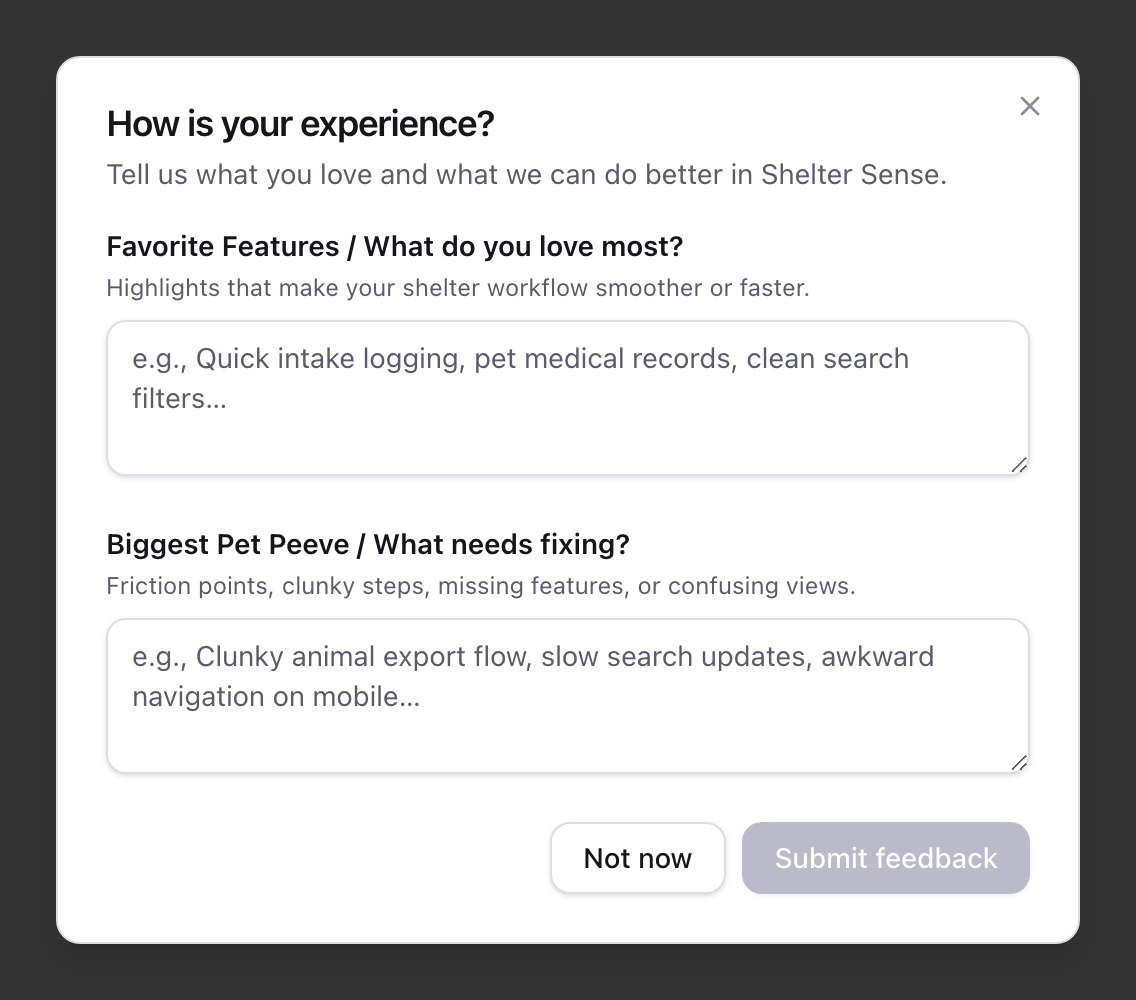
Because the questions are new, everyone sees the prompt once more after this update, even if you answered or dismissed the old one a few days ago. After that it goes back to its usual schedule.
Where: The "How is your experience?" prompt, for organisations that have it turned on.
Behind the scenes
Fewer false alarms in our error reports
A request that fails and then succeeds on the retry is ordinary life on shelter wifi. It is now recorded as a warning everywhere, instead of a warning in some places and an application error in others. An archive refused because the animal is signed out is an expected answer and no longer files an error report at all.
The point of both is that a real fault stands out instead of being buried under hundreds of these.
Where: Not visible in the app. It means real problems get noticed sooner.
Only our server changes what every tablet's live view shows
Every open List Mode page keeps a live connection to its organisation's shared room: a small store on our server that tells every tablet the moment an animal is signed in or out, and tells each person how many unread notifications they have. Until now the room took the browser's word for things. Any signed-in member's browser could write any entry in it, including entries only our server should ever set, and could read every entry, including other staff members' unread-notification counts.
The room now accepts changes only from the Shelter Sense server, which takes them from the shelter's records, and each connection can read only the entries every member shares plus its own notification count. Which person a connection belongs to is decided by our server, never by the browser.
Where: Not visible in the app. It closes a way one browser could change what every tablet in a shelter showed.
Missed live updates are tracked until every tablet has them
When our server cannot tell the tablets about a change — a network fault between our servers, or a restart during an update — it now writes the change down and keeps retrying until the tablets have it, as described above. A repair that is still failing after about an hour raises one alert for us, so a stuck repair is noticed the same day rather than waiting for someone to spot an out-of-date card.
The overnight refresh, the last safety net that re-sends every animal to every tablet, also carries on to the rest of a shelter's animals when one batch fails, instead of stopping there. The checks we run before every release now exercise the repair list against a real database, because the timing problems it guards against cannot be reproduced any other way.
Where: Not visible in the app. It means a tablet that missed a change is put right, and we hear about it if that ever stalls.
1.1.4-beta
Released September 9, 2026.
The release history catches up
Three changes had shipped without an entry here: the demo-request fix, the single nightly-maintenance check, and the move of app email and scheduled work to Cloudflare. All three are now written up below, under the release that carried them.
Where: This page, and the release-notes window inside the app.
1.1.3-beta
Released September 9, 2026.
One check that the whole night's maintenance finished
Shelter Sense runs five scheduled jobs overnight. Each one was watched separately, so an incomplete night showed up as a gap in one of five places rather than as a single clear answer.
One check now confirms that all five finished, and alerts us after the morning catch-up window if any of them did not. Each job still retries on its own, so a job that stumbles once and then recovers raises nothing.
Where: Not visible in the app. It means an incomplete night of maintenance is noticed the same morning.
1.1.2-beta
Released September 8, 2026.
Demo requests reach us again
Submitting the demo-request form answered "Error submitting request, please try again", however many times you tried. The form was sending its request to an address the server did not recognise, so nothing was recorded and no acknowledgment was sent — and because the form looked as though it had simply failed, there was nothing to suggest trying another way of getting in touch.
That address is now connected to the handler that records the request and sends the acknowledgment email.
Where: The demo-request form on the Shelter Sense website.
1.1.1-beta
Released September 8, 2026.
This release fixes the ways the app could get stuck and leave you guessing: a sign-in that has quietly expired, a page section that refused to load, a tab left open across an update, and the flaky office wifi that sometimes eats a save. It also makes signing in and the dashboard faster.
- A signed-out session now says so. If your sign-in expires while a page is open (it lasts thirty days), the next thing you do takes you to the sign-in page, and after signing in you land back where you were. Before, the app showed a generic "something went wrong" error and left you to work out that you had been signed out. The app also checks quietly in the background once a minute, so it usually tells you before you try anything.
- Sections that fail to load repair themselves. When part of a page could not be loaded (usually a tablet that lost wifi for a moment while the page was still arriving), the app now reloads once on its own and carries on. Before, that part of the page stayed red until you reloaded it yourself, and live updates could stop for the rest of the visit.
- Tabs left open across an update reload themselves. After we ship a new version, a tab still running the old one gets a single automatic reload the next time it talks to the server, instead of a confusing error.
- A double-tap on Create Animal no longer creates two animals. The button stays locked until the next page has actually opened.
- Sign-in retries once on a lost connection. On shelter and office wifi a request sometimes disappears without an answer. Signing in now tries once more on its own before showing an error, and the app checks its connection straight away so it can tell you if the network is really down.
- Signing in is faster, and so is opening the dashboard: two slow steps that used to run one after the other now run at the same time, and the billing check that runs behind every page no longer waits on our payment provider when your subscription is already known to be in good standing.
- Comments save faster. Adding a comment to an animal no longer waits for the parts of the update that other devices need before telling you it saved.
Behind the scenes
Email and scheduled work move to Cloudflare
App emails now use Cloudflare's email service, with a queue that tracks delivery and retries temporary failures. Scheduled maintenance and the trial-reminder sweep also run on Cloudflare. Nightly jobs retain a catch-up run so a missed first attempt can be recovered without repeating work that has already finished.
Where: App emails and background maintenance.
The sign-in service can be updated without a gap
The service every sign-in depends on used to be replaced in one go during an update, which left a short window in which nobody could sign in. It now starts the new copy, waits until it can reach its database, and only then switches over, and it will run as a pair so a restart outside an update does not take it down either.
Where: Not visible in the app. It matters on the day we ship an update.
Better eyes on the service
The dashboards we watch, the alerts we receive and the checks that confirm the site and the nightly jobs are running are now defined in code with the app, reviewed like any other change, and cover the gaps found in this release's investigation. Network blips on shelter devices are recorded as warnings instead of being filed as application errors, so a real fault is no longer buried under them.
Where: Not visible in the app.
1.1.0-beta
This release moves the database that holds your shelter's records to new hosting. Nothing changes in how you sign in, where things are, or what you can do. What changes is what happens underneath every page and every save: it is now closer, backed up more often, and no longer depends on a service that had been the cause of the occasional "the server is having a bad moment" error.
Behind the scenes
Your records now live next door to the app
Until now, every time Shelter Sense read or saved a record, the request travelled from the servers that run the app in Toronto to a database in the eastern United States and back. The database now runs in the same Toronto facility as the app, so that round trip is gone. Pages that read a lot of records, such as List Mode and reports, feel quicker, and saves come back sooner.
The database also runs as a pair: a second copy stands ready, and if the first one fails the second takes over on its own within moments, without anyone at the shelter needing to do anything.
Where: Not visible in the app. Every page and every save benefits.
Backups every hour, kept for ten days
Your records are now backed up every hour, with a full copy taken every day, and ten days of history is kept. If something ever had to be restored, we can bring records back to a chosen point in time within that window instead of only to the previous night.
Where: Not visible in the app. It matters on the day something goes wrong.
Fewer "bad moment" errors
The brief server errors that earlier releases learned to recover from came from the service that used to sit between the app and its database. That service is no longer in the path, so that whole family of errors goes away rather than being retried.
Where: Any page, most often while saving or opening a long list.
- Lists sort the way people read. Anywhere Shelter Sense orders by name, the order is now alphabetical regardless of capitalisation, so "bella" no longer sorts after "Zeus". Before, a name that started with a lowercase letter fell to the very end of the list.
- Maintenance The move itself happens during a short, announced maintenance window of a few minutes, during which Shelter Sense is unavailable. Nothing entered before the window is lost, and nothing needs to be re-entered after it. Version numbers now step to 1.1 to mark the change.
1.0.26-beta
This release is a broad reliability pass. It concentrates on the moments where two people act at once, a connection drops halfway through a save, or older records outlive the settings they were created with.
Speed
List Mode is usable the moment it appears
On a long roster, List Mode used to pause for several seconds after the page appeared while it prepared every animal's card at once — taps and clicks did nothing until it finished. It now prepares only the cards near the top right away; the rest keep their place on the page and finish preparing just before you scroll to them. Every card still receives live updates the whole time, whether or not it has been prepared yet.
Where: List Mode.
Sort the List Mode summary by any column
Every heading in the List Mode summary table is now a sort control. Click a heading to order the rows by that column, click it again to reverse the order, and the animal cards below follow the same order. The choice is kept in the page address, so it survives a reload and can be shared as a link. Clicking a row still scrolls to that animal's card, and an animal whose live status changes moves to its new place in the order without a reload.
Where: The summary table at the top of List Mode.
Saving and working offline
A failed save now tells you what happened
Several forms handled a refusal from the server but not a lost connection or an unexpected server failure. In those cases the button stopped spinning and nothing else happened. Archive, restore, cohort removal, placement changes, census export, and other affected actions now show a clear error and leave the current screen in a safe state.
Multi-part edits now save as one operation as well. An animal edit, special need edit, assessment, or access approval can no longer leave only half of the requested change behind.
Where: Animal editing, reference-data settings, access requests, reports, and List Mode.
Offline work stays attached to the right account
A connection changing state at exactly the wrong moment could make an online save disappear instead of either reaching the server or joining the offline queue. The app now decides once which path owns the save. Signing out and switching accounts also fail closed if private offline data cannot be cleared, rather than opening another account over the previous user's cached records.
Where: List Mode saves, sign out, and account switching on devices that work offline.
Records and history
Assessments can now be corrected or removed
Until now an assessment could only be added. If one was recorded by accident, on the wrong animal, or by someone who had misunderstood what an assessment is, there was no way to take it back — so the workaround was to file a second, empty assessment to cancel out the first. That left invented records in the behavioural history of a real animal.
Each animal card now has an Assessments button listing everything recorded for that animal, newest first, with Edit and Delete on each entry. Editing changes the wording only; the date an assessment was recorded stays as it was, because that date is what the assessment-due countdown is measured against. Deleting asks for confirmation first.
Deleting the most recent assessment brings that animal's assessment-due countdown back, exactly as if the assessment had never been recorded. An animal can never be left looking up to date because of an assessment that was removed.
Editing an assessment needs the same permission as editing an animal, and deleting one needs the same permission as deleting an animal, so a volunteer who cannot change animal records cannot change assessments either.
Where: The Assessments button on each animal card in List Mode.
Training plans can be removed from an animal
A training plan written for the wrong animal, or one that no longer applies, can now be removed from the animal's profile. The Training Plan panel on the animal detail page has a Remove button that asks for confirmation and then shows the panel's empty state, ready for a new plan. If the plan fails to load, the panel offers Try again instead of leaving its buttons disabled.
The Delete button on the Training Plans list page now appears only for people whose role allows deleting training plans; before, it was shown to everyone and then refused.
Where: The Training Plan panel on each animal's detail page, and the Training Plans page.
Animal sex and other structured details
Animals now have a Sex field with Male, Female, Intersex, and Unknown choices. Existing animals begin as Unknown, and Sex appears in List Mode by default. Administrators can also add their own text, number, date, yes/no, and choice fields for each animal type, decide which ones are required, and choose which ones appear as List Mode columns.
These details are available while adding or editing an animal, in Quick Edit, during cohort quick-add, on animal cards and detail pages, in search and filters, and in animal-related CSV exports. Archived fields and choices keep their historical values, including through offline syncing.
Where: Animal Type Options, animal forms, List Mode, animal details, filters, exports, and offline work.
Old reports keep the facts that were true at the time
Cohort membership is now recorded on stays, enrichment sessions, and evaluations. Moving an animal between cohorts no longer rewrites earlier census or enrichment results. Completed assessments also keep the funnel that produced them instead of changing when today's animal settings change.
Historical records are protected from destructive cleanup too. A color code, special need, role, or animal cannot be removed when doing so would erase or expose records that still depend on it. Animals with placement history remain available to historical census reports, and an animal on an active outing must be signed back in before it can be archived.
Where: Census, enrichment reports, assessments, roles, animal settings, and archive actions.
Dates and page numbers are checked before saving
Placements can no longer end before they begin, arrivals cannot be dated in the future, and malformed or fractional page values no longer reach database queries. These are rejected with an explanation before they can create a record that later reports cannot interpret.
Where: Animal intake and outcome history, placements, and paginated lists.
Invitations, reports, and files
Invitations and organization setup are safe to retry
Organization creation now includes its default roles and settings in the same transaction, so a temporary database failure cannot leave a paid organization only partly usable. Super-user provisioning can resume after an interrupted attempt. Expired, revoked, or cancelled invitations stay unusable, and simultaneous invite, accept, cancel, and access-request actions now have one database-backed winner.
Deleting a role also refuses while current users, pending invitations, or restricted comments still depend on it, so access cannot silently broaden.
Where: New organization setup, invitations, access requests, and role management.
Reports and uploads clean up after themselves
Two identical report requests made together now produce one job. Report failures show a safe, useful message without exposing database or service details, and retries cannot race into duplicate work. Failed CSV downloads now tell you they failed.
Replacing a photo or deleting a training plan now removes superseded files only after the database change succeeds. Failed uploads are cleaned up, and direct upload endpoints apply the same subscription checks as the rest of the app.
Where: Generated reports, CSV exports, animal photos, and training-plan files.
Signing in and older devices
Tab moves straight from email to password
On the sign-in page, pressing Tab in the email box used to land on the "Forgot password?" link, so reaching the password box took two presses. The link now sits below the password box, where it is still reachable by keyboard, and Tab goes from email to password in one press. Staff who share a tablet and sign in many times a day asked for this.
Where: The sign-in page.
Out-of-date browsers are told, and stay readable
Shelter Sense's colours use a colour format that Chrome added in version 111 (March 2023). A Chromebook past its update expiry, or any older browser, silently dropped every one of those colours: badges lost their fill and dialogs lost their background, so a training plan appeared on top of the card behind it. Those browsers now see a clear notice at the top of every page saying the browser is too old and should be updated, and the panels and the primary badge keep a plain fallback colour so the page stays legible in the meantime. Up-to-date browsers are unaffected.
In the same spirit, a card whose training-plan status has not arrived yet shows Unknown rather than a confident "NO", and Quick Edit does not offer to create a plan until it knows whether one exists.
Where: Every page on an old browser; the training-plan badge on animal cards.
Behind the scenes
The release checks now exercise the corrected failure paths and reject new lint, type, migration, or regression failures before the app is released. The upgrade from the previous version was also rehearsed on a device that had used offline mode, so queued offline work survives the update, and the platform libraries the app is built on were brought up to date.
1.0.25-beta
A small release. One fix for something that only happened when our server was having a bad moment — and which, when it did happen, left you stuck — plus repairs to the reports we rely on to find problems like it.
Fixes
A broken panel instead of the sign-in page
When your session has ended, or your access to a shelter has changed, the app is meant to move you to the sign-in page. If our server happened to be slow at that exact moment, it did something else instead: it left you where you were, with the list replaced by an error message, and never moved you anywhere. Reloading produced the same thing, so there was no obvious way out except closing the tab.
The app has to decide where to send you before the page starts drawing. Normally it does. When the server was slow to answer, the decision landed after drawing had already started — too late to move you, so it surfaced as a broken panel instead. It now recognises when it has missed that moment and moves you from your own browser instead, which still works.
Where: Any page inside a shelter, when a session ends or access changes during a brief server hiccup.
Behind the scenes
Error reports that said where the problem was
Nothing here changes what you see. When the app hits a problem it sends us a report, and for a few days those reports came back from part of the app with the location missing — a position inside one very large file, rather than the file and line the problem was actually in. The fix above was found in spite of that, not because of it.
Two separate faults caused it, and both are fixed: the reports are readable again, and a check now runs before every release that refuses to ship if they would not be. We have also stopped publishing a set of developer files alongside the app that were never meant to be public.
Where: Not visible in the app. It means problems you report get diagnosed faster.
1.0.24-beta
The last release fixed the tablet hanging in List Mode. It did not make pages open faster, and several of you told us so. This release is that — the waiting before a page appears, and the spinner after you sign an animal in or out.
Opening a page
The blank moment before a page draws
Before showing you anything, every page inside an organisation asked our server three questions in a row: who you are, which shelter you are in, and whether you are allowed to be there. Each one waited for the previous one to come back, and nothing at all was drawn on screen while that happened. On a cold open, List Mode held a blank screen for roughly two seconds before it even began asking for the animals.
Those three questions are now one question, asked once, before the page starts drawing — and asked in a place where the answers are already close at hand, so it costs less than any one of the three did before.
Where: Every page inside a shelter. Most noticeable opening a page cold, or after the app updates.
List Mode asks for the heading and the animals at the same time
The list of animals was fetched only after the page heading came back, because the heading was the only thing that knew which shelter and which animal type you were looking at. So the two waits happened one after the other rather than together.
The server can work both of those out on its own, so it now does, and the page asks for both at once. The wait is the longer of the two instead of the sum.
Where: Every List Mode page.
Four questions we were asking and then ignoring
Four separate requests on the busiest paths existed to produce answers that were thrown away — one of them asked before every single page render. Nothing read them. They are gone, and nothing about what you see has changed.
One of these was quietly making a real problem worse: when our sign-in service had a hiccup, the app reported it as "you are not signed in" and sent you to the login page. It now reports it as what it is, a temporary fault.
Where: Every page inside a shelter.
Signing in and out gives the tablet back sooner
Signing an animal in and editing an animal are the two things you do most, and both were taking around three seconds. Almost none of that was saving your work — the save finished quickly, and then the app kept you waiting while it tidied up afterwards: clearing caches in small batches with deliberate pauses between them, and telling every other open tablet what had changed, across the internet, retrying if that failed.
Your work is saved at the moment the save finishes, so that is when you get the tablet back. The tidying still happens, just not while you are standing there holding it. Your own screen already knew about the change; other people's screens are told the same way they were before.
Where: Signing in, signing out, undo, and editing an animal.
Live updates connect without doing a page's worth of work
Every time a tablet opened its live connection, the app ran the same heavy lookup a whole page render runs — including, occasionally, a call out to our payment provider — to read one small fact from it and discard the rest. Those connections are made far more often than pages are opened.
It now asks only the question it actually needs answered.
Where: Automatic, on every List Mode page.
Fixes
A signed-out tablet that retried forever without telling anyone
A tablet whose session had ended kept trying to reconnect every thirty seconds, indefinitely, and said nothing about it. In one day that was more than four hundred attempts from a single tablet — each one a full request to our server to be told something the tablet already knew, that it had no session.
It now recognises that itself without asking, and, more to the point, it tells you: a tab that has been signed out says so instead of sitting there looking fine and quietly doing nothing.
Where: Any tab left open long enough to be signed out.
Quality of Life said "no records" while List Mode showed a score
For a short window after an update, an animal's detail page could show a "—" for Quality of Life, hide the sparkline and the Engagement, Wellness and Sentiment tiles, and say there were no records in the last seven days — while List Mode showed that same animal a real score.
Neither screen was wrong about the data; the detail page was misreading days that were recorded before the update as days with nothing recorded on them. It now reads them the same way the rest of the app does.
Where: The Quality of Life section of an animal's detail page.
1.0.23-beta
Two things Toronto Humane has been living with: List Mode making the tablet unresponsive, and work made offline that quietly never syncs. This release is both.
List Mode
List Mode opens three live connections for the whole page, not three per animal
The last release took each animal card from fourteen live connections down to three. That helped, but three per animal is still one set per animal — a list of seventy cats opened over two hundred of them, all at the same moment, every time the page loaded and again every time the app came back after an update. That burst is what the tablet was struggling with.
The page now opens three in total, for the whole list, no matter how many animals are on it. A list of five hundred costs exactly what a list of five costs. Nothing about the cards or what they show has changed.
You should notice this most on first load and in the minutes after an update — the two moments the hanging was worst.
Where: Every List Mode page.
Two ways your screen could quietly disagree with someone else's
Both of these only happened when two people were working at once, which is why they were easy to miss and hard to describe.
If somebody signed an animal in while your page was open, and you then expanded that animal's card, the card could go back to showing it signed out. Your screen said one thing and theirs said another until you reloaded.
Separately, the very first time an animal was signed in after an app update, nobody else's screen was told about it at all.
Both are fixed.
Where: List Mode cards and the summary table.
Offline
Work that could not sync now sorts itself out
When a change you made offline is rejected by the server, it used to stay stuck until somebody opened Sync issues and pressed Retry. In practice nobody does — we found someone carrying two weeks of undelivered work without knowing it.
Some rejections fix themselves: a role that was removed and later restored, or a subscription that lapsed and was renewed. In both cases the change would go through perfectly well on a second attempt, and nothing was ever making one. Those now retry on their own, a few hours apart, several times over.
The rest are left alone deliberately — an animal that has since been deleted, a clash with something a colleague already recorded, an entry the server will not accept. Retrying those would fail the same way forever, so they still wait for you on Sync issues, where you can review and re-enter them. Nothing is ever discarded on your behalf.
Where: Automatic. Sync issues should have fewer rows waiting for you.
1.0.22-beta
Nothing looks different in this one. The last release started with Toronto Humane telling us the site was hanging, and we would rather not need to be told next time — so this release is the app learning to report how it is doing.
The app now measures itself
Until now, if a page was slow for you, the first we knew about it was somebody mentioning it. We could see errors — the moments the app broke outright — but not the far more common case where everything works and simply takes too long. That is the gap the last release was spent closing after the fact.
Every action the app takes now records how long it took and whether it worked: opening a list, saving a comment, signing an animal in or out. So do the parts you never see — work saved offline making it to the server, live updates dropping and coming back, the nightly reports. We watch those numbers rather than waiting for a phone call.
Two things worth saying plainly. This does not make the app faster on its own; it tells us where to look, which is what the last release needed and did not have. And it records timings and counts only — never names, notes, comments, or anything about a specific animal or person.
Where: Nothing on screen changes.
1.0.21-beta
Toronto Humane told us the site was hanging and that Chrome kept saying the page was not responding, most of all right after an update. We measured it from one of your own tablets, found two things that were far heavier than they needed to be, and fixed both.
List Mode
List Mode loads its cards in one go
Every card on the list was asking the server for its own details separately — seventy-two separate requests for a list of seventy-two cats, each one also re-checking who you are before answering. The cards all waited for the slowest of those before any of them filled in, which is why the grey placeholders sat there so long, and that many requests at once is what was tripping the brief "busy" spells that turned into error pages.
The list now asks once, for all of its animals together, and every card fills in from that one answer. Nothing about the cards themselves has changed.
Where: The detail cards on every List Mode page.
Live updates cost the tablet a fraction of what they did
Each animal card was keeping fourteen separate live connections open for things that only needed three. That was fine for one card and not fine for seventy, and when the site came back after an update every tablet re-opened all of them at the same moment — which is the hang you saw. Worse, every time that happened a few of the old ones were left behind, so each update was a little heavier than the last.
Each animal now keeps exactly three, shared by everything on the page that shows it, and reconnecting re-opens exactly those three — no more, and none left behind. Tablets also now come back in a gentle spread over the first couple of minutes after an update rather than all at once.
Where: List Mode, especially in the minutes after an update.
You can now review a change that could not sync
When a change made offline is rejected later — for example a sign-in that clashed with one somebody else had already recorded — the Sync issues page used to tell you to review it and re-enter it, while offering only Retry and Discard. There was nothing to review.
Every row on that page now has a Review button. It shows exactly what was entered — the animal, the comment, the rating, the scores, who the comment was visible to — so you can copy it across before discarding the old copy. Rows also name the animal instead of saying "a change to sign animals in".
Where: Sync issues, from the warning badge in the top corner.
Fewer blank pages during a busy moment
Two small checks that run on nearly every page — confirming you belong to the organisation, and counting the animals for the sidebar — had no second try if the data service was busy for a second. One of them failing meant the whole page failed. Both now wait a moment and try again, like the rest of the app already did.
Where: Any page in the app, and the Animal Lists section of the sidebar.
Working offline
Your device is now reliably ready to work offline
The copy of your animal list that the app keeps on the device — the one it shows you when the connection goes — was fetched during a quiet moment, and the app asked the browser to pick that moment without ever saying how long it was prepared to wait. On a busy screen the quiet moment can be a long time coming, and the animal list is the busiest screen there is. If it had not arrived by the time you walked out of range, there was no copy at all: the list simply came up empty offline, with nothing to explain why.
The app now waits a few seconds for a good moment and then goes ahead regardless.
Where: Any animal list, on a device where offline working is turned on.
A long queue of offline changes now finishes syncing on its own
Changes made without a connection are held on the device and sent up once you are back in range. They were sent twenty-five at a time — and only twenty-five. If a shift had produced more than that, the rest stayed on the tablet and waited for something else to happen: the connection dropping and returning, the screen being locked and woken, or somebody closing the tab and opening it again. Left alone on the animal list, as a shelter tablet usually is, nothing else happened, and the remainder sat behind "will sync automatically" for the rest of the day.
The app now keeps going until the queue is empty.
Where: Anywhere you work offline. The count is in the sync badge, and the details are under Sync issues.
A change that failed once no longer waits for you to do something else
When sending a change did not work — a moment of bad signal, usually — the app waited a little before trying again, doubling the wait each time up to fifteen minutes. But nothing was actually watching the clock. The wait ended only when something unrelated woke the app up, so a single failure could park one animal's sign-out until the tablet was next picked up.
The app now comes back by itself when the wait is over.
Where: Anywhere you work offline.
Your account and your organisation
An inactive subscription is now read-only everywhere, including deleting an animal type
When a subscription lapses the app becomes read-only: you keep your data and can still read it, but changes are held until billing is sorted out. One screen was not covered. Deleting an animal type went through — and the version of that action which also removes every animal of that type went through too.
That is the most destructive thing the app can do, and it was the one thing an inactive account could still do. It now refuses like every other change.
Where: Settings, Animal Types. Nothing changes for an active subscription.
Your email address is now shown rather than edited
The email on your account page could be typed over. It looked like it worked, and it did change what the page showed — but your sign-in details live somewhere separate, so the two stopped agreeing. The next time you loaded the app it looked you up by the address you actually sign in with, did not find you, and started you off as somebody new: still signed in, but with none of your organisations.
The field is now shown for reference and cannot be edited, with a note pointing at support. If your account has already ended up in that state, get in touch and we will put it back.
Where: Account, under your name.
A few organisation web addresses are no longer available
Your organisation's short name becomes the first part of every link you use — sheltersense.ca/your-shelter/.... A handful of words are used by the app itself, and one of those would have made links inside your organisation behave strangely. New sign-ups are now told to pick another one instead of finding out later.
Existing organisations are unaffected.
Where: Choosing a name when a new organisation signs up.
Security hardening
This release tightens several checks behind the scenes — how the app decides who is allowed to administer it, how it treats the link you are sent back to after signing in, and what it says when you ask to reset a password for an address that has no account. None of this changes anything you do day to day.
We have no evidence any of it was used against your data.
Where: Signing in, password reset, and staff-only administration screens.
1.0.20-beta
This one came from Toronto Humane, who told us List Mode was slow, staff could not sign animals back in, and a small red error box kept appearing. Thank you for saying so — it turned into a pass over every place the app gave up at the first sign of trouble instead of trying again.
Signing animals in and out
Signing an animal back in no longer fails part-way through
Bringing an animal back records several things at once: the visit itself, a health note if you left one, your comment, and the fact that the animal is no longer out. The app was saving these one at a time, and each one is a separate trip out to the database. On a busy afternoon that added up past the time limit, the whole thing was thrown away, and the animal stayed on the board as still out.
Worse, it looked like it had worked right up until it did not. Trying again then said the animal was already signed out — which was true, but only because the first attempt had failed halfway.
It is now saved in one trip instead of several, so there is no longer a clock running against it. If that one trip does hit a hiccup, the app tries again on its own, and it cannot record the same visit twice while doing so.
Where: The sign-in form on any animal card in List Mode.
A brief hiccup no longer turns into a red error box
The service that carries our data occasionally gets busy for a few seconds and drops whatever happens to be passing through at that moment. It is not personal to your request and it passes quickly — but signing an animal out, checking your permissions, and loading the dropdown lists all gave up the instant it happened, and you got an error.
All of these now wait a moment and try again. Because these interruptions last seconds, the second attempt almost always goes straight through and you never see anything.
The Animals page gets the same treatment. Its first retry was tuned for a different kind of interruption and gave up inside the same few seconds the busy spell lasted, so the page could still come up with an error; it now waits long enough to outlast one.
Where: Signing animals out, the Animals page, and most screens in the app.
Adding and editing an animal survives a hiccup too
Saving an animal writes several things together — the animal, where it is kennelled, which lists it belongs to, its shelter ID. If the data service had one of its busy moments part-way through, the save failed and you got an error, even though there was nothing wrong with what you had typed.
Those saves now try again on their own. Adding a new animal was the delicate one: trying again must not leave you with two of the same animal. Each save now carries an identifier from the moment you press the button, so if the app has to try again it recognises the work its first attempt already did and finishes it, rather than starting a second one.
Where: The Add Animal form, and editing an animal's details.
The board keeping itself up to date
Live updates no longer quietly stop working
When someone signs an animal out, everyone else's screen is supposed to update by itself. On tablets left open for a long time that connection was gradually breaking, and the app did not always notice — so two people could look at the same animal and see different things.
The cause was ours. Every few hours the app renewed the pass that lets it hold that live connection, and renewing it accidentally left the old connection behind instead of replacing it. Those abandoned connections kept calling in, and enough of them eventually crowded out the real one. Tablets left running overnight were the worst affected, because they had done it the most times.
The app no longer needs to renew anything mid-session, so there is nothing left behind and nothing to crowd the connection out.
Where: List Mode, on every device with the app open.
An edit no longer goes missing from everyone else's screen
When you change an animal, everyone else looking at the board is told about it so their screen updates. That message was being put together after your change had already been saved — and if the data service hiccupped during that step, the message was dropped silently. Your edit was safe, you saw no error, and everybody else carried on looking at the old version of the card until something else refreshed it.
The step that was failing only decides which shelter ID system to label an animal's ID with. It now tries again, and if it still cannot answer, the update goes out without that label rather than not going out at all.
Where: List Mode, on everyone else's screen, after you edit an animal.
Pages that used to fail all at once
One missing piece no longer takes out the whole list
List Mode loads the comment counts for every animal on the page in a single request, which is much faster than asking for each one separately. But if that single request failed, every card on the page failed with it, and the list came up broken.
Three things changed. The list itself no longer depends on that request succeeding — the animals, their kennels, their colour codes and their sign-out forms all appear regardless. The request now retries by itself before giving up at all. And if it still does not arrive, the card says so, then fetches the comments again on its own as soon as you open that card's Comments tab, so they fill themselves in without you reloading anything.
Waiting for you to open the tab is deliberate, and we got it wrong first. Fetching them back for every card at once meant a long list firing off a couple of hundred requests in the space of three seconds — which is the exact thing the single combined request exists to avoid, and the exact thing that was overloading the data service in the first place. Our own testing caught it before it reached you. Now only the card you are actually looking at goes back for its comments.
Where: List Mode.
Panels that stall now recover on their own
If your connection stumbled while part of a page was still arriving, the app already knew how to quietly fetch it again — but only when the browser described the problem in one particular way. Safari, Chrome and Firefox each word it differently, so on most browsers the app did not recognise its own recovery case and simply gave up.
It now recognises all of them, so a stalled panel refreshes itself instead of sitting empty or showing an error.
Where: Anywhere in the app, most visibly the sidebar and the animal cards.
1.0.18-beta
One correction to the last release, from someone telling us it still was not right.
The "switching over" spinner now actually appears
Last release said that pressing Reload on the update message would show a spinner while the new version took over. It did not. The spinner was being created and then removed again in the same instant, so pressing Reload cleared the message and left you looking at an unchanged screen for several seconds before the page finally reloaded — which is exactly the "did that button do anything?" moment the spinner was added to prevent.
It now stays up until the page reloads, so there is something on screen for the whole wait.
If you have been seeing the update message come back after reloading, that was a tab still running the older version from before these fixes. Once a tab has loaded this release it stops.
Where: The "Update available" message, on any device with offline mode switched on.
1.0.17-beta
This one started with a single report — an update message that would not go away — and turned into a pass over the moments where the app was busy and never said so.
Updates that would not install
"Update available" no longer comes back every time you reload
After the last release, some people saw "Update available — Reload", reloaded the page, and got the same message straight back. Reloading again did the same thing. The message never expires on its own, so it simply sat there.
The cause is an unkind detail of how offline support works. A new version of the app installs quietly in the background and then waits for the old one to step aside — and pressing your browser's refresh button does not make it step aside. Only the button inside the message did, and even that had a timing flaw that could miss. So reloading the way anyone would normally reload left you in a loop with no way out of it. The previous release was the first one able to hand out a new version at all, which is why this surfaced now and not sooner.
The app now steps the new version in itself, at a moment when doing so costs you nothing: not while you are typing, not with a dialog open, and not in the middle of syncing. The message still offers a Reload button if you would rather not wait, it can now be dismissed, and repeats no longer stack up.
Pressing that Reload button also used to sit there looking like it had done nothing, because swapping the version over takes a moment. It now shows a spinner and tells you it is switching over, and the app says the same thing on the occasions it updates on its own — a page that reloads itself with no explanation reads as a glitch rather than an update.
We also added an alarm on our side for a device that cannot take an update. This particular failure was invisible to us — every request succeeded, nothing crashed, and the only place it existed was on the affected screen — so the first we knew of it was someone taking the trouble to write in. Thank you for that.
Where: The "Update available" message, on any device with offline mode switched on.
Knowing the app heard you
A loading bar while the next page is on its way
Tapping a link fetches the next page before anything on screen changes, so on a slow connection nothing happened for a moment and it was easy to think your tap had been missed — and to tap again.
There is now a slim bar across the very top of the screen while a page is loading. It waits a moment before appearing, so quick taps still feel instant rather than suddenly looking like they load, and it stays up until the new page is actually on screen rather than dropping away just before it arrives.
It does not pretend to know how far along it is — there is no way for us to know that — so it sweeps rather than filling toward a finish line it would only have guessed at.
Where: Every page-to-page move inside the app.
Important notices stay put, and are easier to read
Announcements from us — a rollout going out, a scheduled maintenance note — sat at the top of the page and scrolled away with everything else. If you were part-way down a roster when one arrived, you would never see it.
Those notices now stay pinned at the top of the screen while you scroll, and they are set a size larger so the message reads at a glance instead of squinting. They can still be dismissed.
Where: App-wide notices, on every page.
1.0.16-beta
This release comes from using the app the way you do — clicking through every screen, on a phone, in dark mode, signing animals in and out — and fixing what we found. Some of it is embarrassing to write down, so the sign-out button is the honest place to start.
Things that were broken
Signing out works again
Clicking Sign out did nothing. No error, no redirect — the request quietly stalled on our side and the screen stayed where it was, still signed in. Every sign-out button in the app was affected, and nothing in our automated checks covered it, which is how it shipped. Signing out is now a plain, boring page request that lands you on the login screen in one click, and the missing check now exists.
The same underlying fault could also swallow anything you did after your session had quietly expired — a save that neither saved nor explained itself. That situation now takes you to the login page instead of leaving you typing into a dead session.
Where: Every sign-out control, and any save made after a session expires.
You no longer get signed out for no reason
The opposite problem, and the more disruptive of the two. If the service that checks your login had a bad moment — a restart, a slow reply, a network blip between it and us — the app read that non-answer as a firm "this session is invalid", signed you out, and then remembered that answer for the next five minutes, so signing straight back in did not reliably help. You had done nothing wrong and there was nothing to see; the app simply decided you were logged out.
A check that fails to answer is now treated as exactly that. Your session is left alone, the request is retried a couple of times, and if the problem really persists the app tells you the sign-in service is unavailable instead of quietly logging you out. A genuinely expired or invalid session is unchanged — that still returns you to the login page, as it should.
Where: Anywhere in the app, at any moment — most likely during one of our own updates.
Trial reminder emails can no longer go missing
The nightly job that emails trial-ending reminders marked a reminder as sent before confirming it had actually gone out. If it met a momentary conflict — two sweeps touching the same organization's settings at the same instant — the reminder was recorded as sent having delivered zero emails, and every later run then skipped it as already handled. That reminder was lost for good, silently, and the first anyone knew of it was the trial ending unannounced.
A reminder is now only recorded once at least one email has genuinely been delivered, and that step retries rather than giving up on the first conflict. Separately, subscription changes made by our own nightly jobs now reach your billing screens right away instead of after a delay.
Where: Trial-ending reminder emails to organization admins, and billing screens.
An animal nobody has observed no longer hides its Quality of Life score
A scoring window containing no observations at all showed a blank "QoL —" where the model should have scored it around 29 — Critical. In other words, the animals most in need of someone's attention were exactly the ones showing no score. Those windows now score, and the animal page says plainly when there is genuinely no data yet rather than showing a dash that could mean anything.
Where: The Quality of Life card on animal pages, and any trend built from it.
Cohorts limited to one species now mean it
A cohort set up for dogs offered every species in its Add Animals picker — and if a bird was picked, the server accepted it. The picker now shows only the matching species and says so, and the server refuses a mismatch with a clear message no matter how it arrives.
Where: Cohort pages → Add Animals.
Saving now says so
A surprising number of forms closed silently on success: creating a person, creating an assessment, editing an evaluation — and every save on the settings page, whose "Saved." confirmation was being destroyed by the page refreshing underneath it before it could ever appear. All of them now confirm with a small notice. Creating your first animal type was the worst of these: it created the type and then simply sat there, blank; it now returns you to where you started, new type in place.
Where: Settings, people, assessments, evaluations, and animal types.
A behaviour colour that reads "None" on an animal that has one
Reported to us from the floor: a behaviour colour showing None in the list while the Quick Edit for that same animal, opened seconds later, showed a different colour. The two read the animal's colour by different routes, and only one of them needs the colour's name and shade as well as its identity — so a colour code missing either could go blank in the list while the edit form still had it. It appears after an edit rather than on a fresh page, which is what made it look like colours changing on their own.
We found one way this happens and closed it. The list needed a colour's shade as well as its name before it would show anything — and it never actually needed the shade, because it can colour the badge from the name alone. So a colour code missing its shade went blank everywhere it appeared, for a detail nothing was using. That requirement is gone.
Around that, three more changes. The list will no longer answer "None" for an animal that has a colour: where the colour can be identified it is shown, and where it genuinely cannot the badge says "Unknown" instead of claiming there is none — these colours are your caution system, and a confident wrong answer is worse than an honest gap. Beside an "Unknown" badge there is now a small refresh button that reloads that animal for everyone looking at it, not just for you. And a colour code that is somehow missing its name or shade is repaired the moment we see it, rather than waiting for someone to notice.
Separately, every part of a page now agrees about an animal. The summary row, the card header, the card body and Quick Edit each used to fetch their own copy, and those copies could be up to a minute apart in age — so two parts of one screen could genuinely disagree. They now share one, and the newest wins.
One possibility remains open, rarer and harder to catch in the act. This release reports it to us with the record attached the moment it next occurs.
Where: The Behaviour Colour column, and the behaviour badge on animal cards.
The app is harder to knock over
A brief server hiccup no longer takes down the whole page
When we publish an update — or a connection drops for a moment — a request caught in the wrong instant could fail, and one failed corner of a page replaced the entire app with "Something went wrong". Each section of a page now contains its own trouble: the rest of the page keeps working, the affected section offers a retry, and a page load that was cut off mid-stream quietly retries itself once before bothering you. Underneath that, requests that are safe to repeat are now repeated automatically when the first attempt hits a blip, so most of these moments resolve without you seeing anything at all.
Where: Every dashboard page — most visibly in the minute or two while we publish an update.
Fewer timeouts when everyone arrives at once
Morning rush — several people signing animals in and out at the same time — could push a save past our database's patience and fail it. The time budgets on those operations now match how the database actually behaves under load, pages answer repeated questions from a short-lived cache instead of asking the database twice, and the live board tolerates a large batch of updates without pausing for some viewers.
Where: Sign-in and sign-out under load, and the live list-mode board.
A tap that fails now says so
If the network dropped in the exact instant you tapped a link, the tap did nothing at all — no error, no message, nothing moved — leaving you to wonder whether you had really hit it, and often to tap again several times. A navigation that fails now tells you it failed, so trying again is a decision rather than a guess.
Where: Any link inside the app, on a weak connection.
The offline copy of your shelter builds more reliably
Preparing the offline snapshot is the heaviest single thing the app asks of our database, and it was the last place with no protection against a momentary blip. When one landed, the whole snapshot failed and what reached the device was a raw, unreadable error. It now retries the way the rest of the app does, and if it genuinely cannot finish it says so in plain words.
Where: Preparing offline access on tablets and phones.
Phones, televisions and dark mode
The app now fills a television
If you run a list on a wall-mounted screen, you have been reading a laptop-sized page marooned in the middle of it. On a 4K panel almost two thirds of the screen was empty background, around text sized for somebody sitting two feet away.
Above roughly 1680 pixels the page now widens to use the space, and on genuinely large panels the whole interface — text, spacing, buttons, the sidebar — scales up with the screen rather than staying laptop-sized in the centre of it. Ordinary laptops and monitors are deliberately left alone: the scaling begins above the largest common desktop resolution, so nothing changes for anyone working at a desk. If you have set a larger default text size in your browser, that is still respected and still the starting point.
Where: Every page, on screens larger than a desktop monitor.
The "back to top" arrow is no longer buried under notifications
The arrow that returns you to the top of a long list sits in the bottom-right corner — and so did every notification the app raises. Two of those never go away on their own (the "update available" prompt and the offline-storage warning), so the arrow could stay covered indefinitely. Notifications now stack above it.
Where: The bottom-right corner of list-mode pages.
Phone-width pages behave
The list-mode card tabs pushed the whole page sideways off the edge of a phone screen; table toolbars with more than one button clipped the first and hid the second; and the census flow diagram squeezed its labels into unreadability. The tabs and toolbars now wrap and truncate properly, and at phone widths the census page shows the numbers behind the diagram as a table instead — the diagram remains on anything wider.
Where: List mode, management tables, and the census report on phones.
Delete buttons look like delete buttons in dark mode
In dark mode, the confirm button on delete dialogs rendered so washed out it read as disabled — the one button in the app that should never be ambiguous. It is now unmistakably red, everywhere, in both themes.
Where: Every delete confirmation, in dark mode.
And a stack of smaller ones
"Sync live status" is now "Sync live data", and does what the old name implied: it used to republish only who is signed in and out, so a stale location or behaviour colour could sit on every tablet with nothing in the app able to correct it. It now refreshes both. The user block at the bottom of the sidebar looked like a menu but did nothing — it is now a real menu with account settings and sign out. Location forms offered both "None" and "Level 0 - None" for bio-security — the clear-the-field option is now labelled distinctly. The report animal picker claimed one count while its banner said another — it now tells you the truth ("showing first 500 of 818"). Census diagram labels no longer clip at the card edge. Weights display with sensible decimal places. A wrong address shows a proper page instead of a bare line of text. Report searches no longer re-capitalize the name you typed. And a handful of labels, placeholders, and dialog descriptions now say what is actually true.
Where: Throughout.
The part you cannot see is the largest in this release: our error telemetry stopped mistaking developers' laptops for production and now scrubs sign-in tokens out of everything it records, the servers got more memory, and the whole release was driven through an adversarial review — dozens of independent checks each trying to break a different part of it — before it came anywhere near you.
1.0.15-beta
Mostly about dates. If someone signs an animal in while their tablet has no signal, the record now carries the time they actually did it — which it did not before, and which was quietly affecting your reports.
Notes and readings taken offline now carry the time you took them
When a device has no signal, a sign-in is held on the device and sent to us when it reconnects. The outing itself recorded the right times — but the note and the health reading attached to it were stamped with the moment the device got back online. This was reported to us as a session reading Departed Aug 11 6:34 PM, Returned 6:42 PM sitting directly above a comment card labelled "captured at sign-in" that showed Aug 13 6:48 AM.
The readings mattered more than the mismatched dates did. Fecal, urine and FAS scores are counted by date, so a reading taken on the Monday with no signal was counted on the Wednesday it synced — landing in the wrong day's numbers, and in the wrong week or month of a trend if it crossed a boundary. Both the note and the reading are now recorded against the moment they were taken.
We have corrected the existing records we could. One gap we cannot close: a note or an inline reading recorded offline on its own — rather than as part of a sign-in — has nothing left on it that remembers the original time, so anything already saved that way keeps the date it synced. Everything recorded from this release onward is right.
Where: Sign-in comments and readings, animal comments, and any report or trend that counts evaluations by date.
A tablet with the wrong date can no longer hide a reading
A reading taken offline was filed under whatever date the device believed it was. A tablet whose clock had drifted badly, or been reset, could therefore file today's reading years in the past — where no report you ever ran would show it again. Readings can now only be backdated by up to a month, so a wrong clock produces a date that looks odd rather than a reading that quietly disappears.
Where: Evaluations recorded offline.
The live board repairs itself after an update again
1.0.13 added a repair that runs after each update, bringing the live sign-in/sign-out board back in step for tabs that were left open. In 1.0.14 that repair asked about every organisation in one request and ran out of time before it could finish, so it gave up having done nothing — and a board left open stayed stale until the 4am nightly pass. It now works through one organisation at a time and completes.
The nightly pass had a quieter version of the same problem: if it could not read the list of organisations, it treated that as "there are none" and reported success. It now says so and tries again.
Where: List mode, after we publish an update.
The rest of this release is invisible to you: a status page for each of our services, and a considerably larger set of automatic checks that have to pass before we are allowed to publish anything at all.
1.0.14-beta
A small follow-up to the update work below. Most of it is invisible — our own build and monitoring, tightened after watching the last release go out — so there is only one change worth your time.
Automatic updates arrive more gently
1.0.13 taught the app to refresh itself onto a new version at a safe moment. Watching the first release that used it, all the tablets in a shelter tended to refresh within about a minute and a half of each other, and the live-updates service briefly struggled under everyone reconnecting at once — which showed up as the board pausing for a moment on some devices. The app now spreads those refreshes across about ten minutes instead. You should notice nothing at all, which is the point; if you were watching closely before, the brief pause after an update should be gone.
Where: Every dashboard page, after we publish an update.
1.0.13-beta
You told us the app broke every time we shipped an update, and that reloading didn't reliably fix it. Both were true. This release is almost entirely about that — what was actually going wrong, and what now stops it.
Updates no longer interrupt you
Saving during an update no longer discards what you typed
If you pressed Save in the seconds while a new version was going live, the page silently reloaded itself. Whatever dialog you had open closed, whatever you had typed was gone, and nothing told you why — it simply looked like the app had jumped. This was the framework's built-in reaction to any server hiccup, and it fired for saves, not just for page navigation. It also hid the problem from us: the failure never reached our error reporting, so a save that vanished this way was invisible on our side. This is fixed. A save that hits a moment of unavailability now shows you an error and leaves your work exactly where it was, so you can press Save again rather than start over.
Where: Every form in the app.
Updates roll out without dropping the app underneath you
Our servers were being replaced abruptly during an update: any request in flight at that moment was cut off mid-answer, which is what produced "Server Unavailable" while your device was plainly online. Replacement machines were also being given real work before they had finished starting up, so the first few requests after an update could fail even though everything looked healthy. Both are fixed. A server now finishes what it is doing before it steps aside, and a new one only receives traffic once it has genuinely connected to the database. Updates also now run the new version alongside the old one and switch over only when the new one is ready, instead of taking capacity away while the changeover happens.
Where: Everywhere — this is how updates are delivered.
A tab left open across an update recovers on its own
A browser tab that had been open since before an update was still running the old version of the app. When it asked for a piece of the app that no longer existed, it showed "Something went wrong" — and reloading sometimes landed on the same broken state, which is exactly what you reported. The app now recognises this specific situation, waits until the new version is genuinely being served, and refreshes itself. What it means for you: a tab you left open overnight comes back working, without a mysterious error page in between.
Where: Any tab left open across an update.
Reloading works again
This is the direct answer to "Reloading doesn't always fix it", which turned out to be the most useful sentence anyone sent us. The app keeps a saved copy of each page so it can work offline. It was giving up on the live version after three seconds and showing you the saved copy instead — and that saved copy could be a day old. So a reload could hand you back the same stale page, over and over, while a hard refresh worked because it skips the saved copy entirely. The app now waits considerably longer for the real page before falling back.
Where: Every dashboard page.
Your browser now actually picks up new versions
The mechanism that tells your browser a new version exists was checking with a copy of itself, so it always concluded nothing had changed. Every device stayed on whichever version it first installed until something forced it to start fresh — which is a large part of why different people saw different behaviour on the same day, and why some of you were reporting problems we had already fixed. Fixed: your browser now sees new versions and picks them up. As a side effect this also stops the app's saved-page storage growing without limit, which could eventually push out your offline data.
Where: Everywhere.
The live board keeps updating after an update — and says so when it doesn't
When a colleague signs an animal in or out, your list updates without you doing anything. That connection has to be re-established whenever we publish an update — and if your tab had been open for more than a few hours, its permission to reconnect had expired, so it was refused. Nothing said so. The board simply kept showing what it had, for as long as the tab stayed open, and only a full reload brought it back. In a shelter that is not a cosmetic problem: two people can take the same animal out, each believing it was available. This is fixed — the connection renews its own permission when it needs to. And because "we fixed the known cause" is not the same as "it can never happen", a Live updates paused indicator now appears in the dashboard header if the live connection genuinely drops, so a stale board never looks like a current one.
Where: List mode and every dashboard page — the live board, notifications, and report progress.
The app now updates itself, but never while you're working
Picking up a new version meant noticing the banner and pressing Refresh, so a tablet left running on a counter could sit on a version from last week — which is part of why some of you were reporting problems we had already fixed. The app now refreshes itself onto a new version, but only at a moment that costs you nothing: never while you are typing, never within a few minutes of your last keystroke, never with a dialog open, and never while work you did offline is being sent. A tab sitting in the background updates quietly. If no safe moment arrives, nothing happens and the Refresh banner simply stays where it is, for you to use when you're ready. What it means for you: the version you're using stops drifting away from the one we're supporting, without anything disappearing from under your hands.
Where: Every dashboard page.
A report being generated during an update no longer fails
Larger reports are built in the background, which can take minutes. If an update replaced the server midway through, that work stopped — and the page went on showing "Generating your report…" indefinitely, with the Retry button hidden for another half hour. This is fixed: an interrupted report is handed back straight away and can be retried immediately. A second fault found while fixing the first was worse. A server standing down could also fail reports that the replacement servers were generating, so a report that went on to build perfectly well was recorded as failed and its result discarded. That is fixed too — a server now only ever hands back its own work.
Where: Reports.
"You're offline" when you weren't
One slow moment no longer puts the whole app into offline mode
"Showing cached data captured just now" while everything was up. The app checks every ten seconds whether it can reach us, and a single slow answer was enough to declare the connection dead. That is not a cosmetic problem: it swapped your live list for a saved snapshot and started queueing your sign-ins and sign-outs as if you were offline. The check itself was also far heavier than it needed to be, so it was slow often. Three changes: the check is now much cheaper, it waits longer before giving up, and — most importantly — it takes two failures in a row to conclude anything is wrong, while a single success is enough to recover. The giveaway was in the message itself: "captured just now" meant we had reached the server seconds earlier.
Where: List mode, and anywhere the offline badge appears.
The "Server unreachable" alert no longer repeats every ten seconds
Reported as "easily 1 every 10 seconds". There was meant to be a limit of one such alert every 45 seconds, but the rule had a flaw that exempted the exact pattern it was written for, so the limit never applied when it mattered. It applies now, and the app also stays quiet about recovering from an interruption it never told you about.
Where: The connectivity alerts on every dashboard page.
An expired login now says so instead of blaming the server
When your session had quietly expired, the app reported it as "Shelter Sense cannot be reached" rather than asking you to log in again — and, worse, kept accepting your work into a queue that could never be saved. It now recognises an expired session for what it is and prompts you to log back in.
Where: Everywhere.
Un-archiving an animal now sticks
If an animal was archived on a device that was offline, that action waited in a queue to be sent later. When sending it partly failed, it was queued again to be retried — and if someone had un-archived the animal in the meantime, the retry archived it a second time, using the original date. So an animal a colleague had deliberately brought back into care was quietly archived again, with the wrong date on its stay, and nobody had done anything wrong. This is fixed: a queued archive now recognises that it has already been applied and does nothing on the retry — whether the animal was brought back the same day or a week later.
Where: Archiving an animal, from any device that has been offline.
Signing up
A completed purchase now creates your organisation even if your browser doesn't make it back
A new subscription was only set up when your browser returned from the payment page to the confirmation screen. If that return never happened — a closed tab, a dropped connection, a redirect landing in the middle of one of our updates — the card had been charged and no organisation existed, and the only way back was signing in again later and hoping. Payment completion is now reported to us directly, and the organisation is created from that, independently of whether any browser arrives. If both happen at once, they settle on one organisation instead of colliding and showing a payment error for a payment that succeeded.
Where: New subscriptions.
Feedback
One report is now one email, however many times you press Send
On 11 August a single bug report reached us twenty-five times. That was our fault twice over: the send could fail after the report had already been delivered, so our system kept retrying something that had worked, and the form left your text in place with the button ready — so pressing Send again was the natural thing to do, and each press added more. Reports are now recorded when you submit them and identified by the submission rather than the attempt, so retries and repeat presses land on the same report. Sorry about the noise; it made your actual reports harder for us to pick out, not easier.
Where: Feedback, and the "How is your experience?" prompt.
The experience prompt stays open while you're typing
Reported as: the dialog "popped and then disappeared before I even had a chance to type anything in the box, and I didn't click away from it". It was closing itself in response to anything else happening on the page — and at the time, a connectivity alert was appearing behind it every ten seconds. It now closes only when you close it.
Where: The "How is your experience?" prompt.
Your report now tells us which version you were running
Several reports described things we had already fixed, and we had no way to tell whether you were seeing an old version. Reports now carry the version your browser was running and the version our servers were running at that moment. What it means for you: fewer replies asking you to reload and try again, and less chance of us chasing something that was already resolved.
Where: Feedback, and the "How is your experience?" prompt.
On "PLEASE TEST YOUR WORK"
Why testing didn't catch these
That was fair, and the frustration behind it was earned. It is also worth being straight about what was actually happening, because it explains why the same features worked fine one minute and not the next.
Almost everything above only occurs in the few minutes around an update being published, or when a connection is briefly slow. None of it shows up when you run the app and click through it — the tests all passed, and the features genuinely worked. What we were not testing was the transition: the window where a new version is going live while people are mid-task, and the window where a device has an old version loaded and the server has a new one.
Two of these were worse than untested, and they are the ones worth admitting to. The alert-frequency limit had a test named for the exact behaviour it was supposed to guarantee — and the test passed only because of the flaw. And the server's own health check reported "ok" no matter what, so nothing it said could ever have been a warning. A check that cannot fail is not a check.
We have started testing the transition itself rather than only the finished state, and the checks that could not fail have been fixed so that they can.
Where: How we build and ship, rather than any one screen.
1.0.12-beta
One bug — reported in the morning, reproduced, fixed, and verified the same day — plus the wider class of edit-form problems it exposed. Each item states what was wrong, that it's fixed, and what it means for you.
Behaviour colours and edit dropdowns
A saved behaviour colour no longer flips back to "None" on its own
Two reports arrived on the morning of August 11:
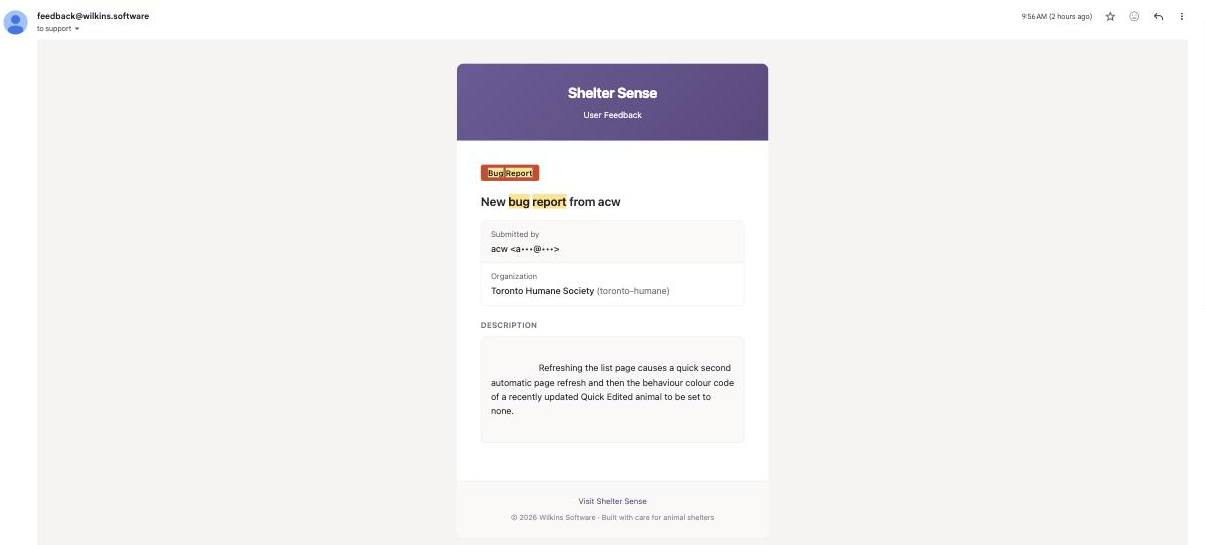
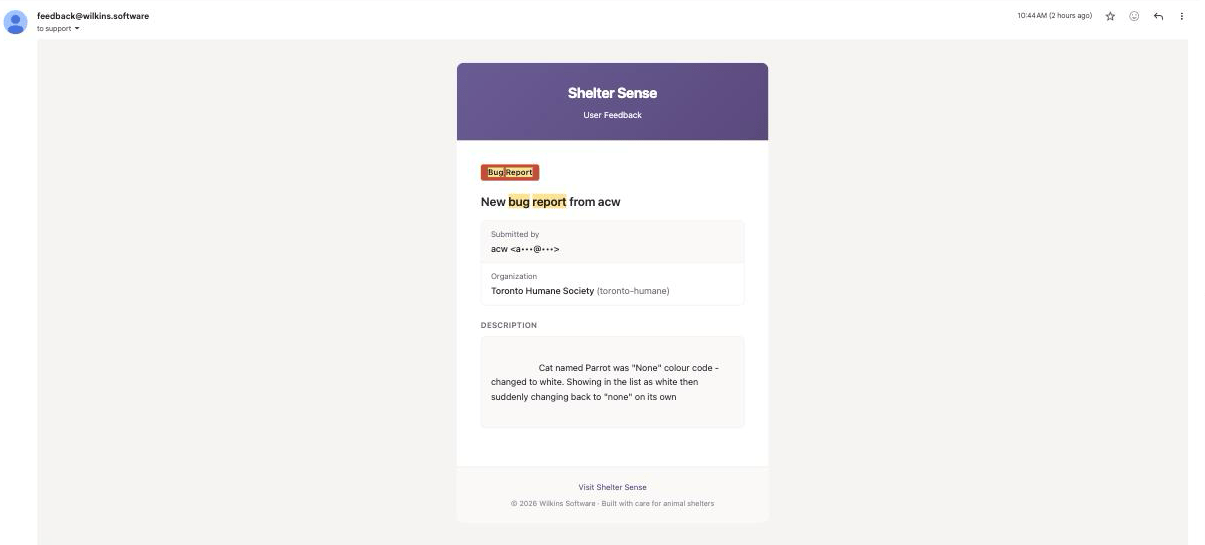
Here's what was actually happening. The Quick Edit dialog's colour dropdown only knew the colour codes that existed when your page loaded. A colour created after that — exactly what happens while you're setting up colour coding — wasn't in its list, so the dialog silently showed "None" for an animal that really had a colour, and because saving writes the whole form, editing any field then erased the colour for everyone, live. That's why Parrot's white vanished "on its own": a routine quick edit made from a slightly older page was quietly taking it away, and no amount of refreshing brought it back because the saved record itself had lost it. This is fixed the same day it was reported: the dialog now always recognises the animal's real colour, and an untouched field can never erase anything on save. What it means for you: what you see in an edit form is what the animal actually has, and saving one field never destroys another.
Where: List mode Quick Edit, Edit animal. Reported 9:56 AM · fixed and verified end-to-end the same day.
Every edit form can now show what's actually saved
The same flaw existed in sibling forms, with different symptoms: editing a location could silently clear its bio-security level; editing an enrichment session or evaluation for an animal that had since been archived showed a blank "select an animal" and blocked the save; a person's type, an animal's type, or a colour code's animal type could show as unset when the page's lists were older than the record. This is fixed everywhere with one shared rule: an edit form's dropdown always includes the record's current value, even when the page's own list doesn't know it yet. What it means for you: opening an edit form shows the truth, and saving it never quietly discards a value you didn't touch.
Where: Edit location, Edit person, Edit enrichment session, Edit evaluation, Edit colour code, Edit enrichment type, timezone settings.
Edit dropdowns refresh themselves when they open
Dropdowns used to offer only what existed when your page loaded — if a colleague added four new colour codes, your open tab couldn't pick any of them until you reloaded. This is fixed: opening an edit dialog now quietly re-fetches its option lists, so new colours, rooms, and types created anywhere appear in the dropdown within a moment of opening it. If the refresh can't reach the server, the dialog simply keeps the lists it had — nothing breaks offline. What it means for you: you can use reference data your colleagues just created without reloading the page.
Where: Quick Edit, Edit animal, Edit location, Edit person, Edit enrichment session, Edit evaluation, Edit colour code, Edit enrichment type.
1.0.11-beta
The fixes in this release, grouped by area. Each item states what was wrong, that it's fixed, and what it means for you.
Losing in-progress and offline work
Sign-in notes kept when someone else ends the session
If a colleague signed an animal in while you were writing the sign-in note, your text was discarded, and a reload or tab switch lost it too. This is fixed: the note is kept across reloads and tab switches. When the session has already been closed by someone else it can't be filed against it, so it's shown on the card as an Unsaved note you can read and copy until you dismiss it. What it means for you: you don't re-type a note because of what someone else did.
Where: List mode — sign-in / sign-out.
In-progress sign-in and sign-out fields kept when the card changes
On the list-mode sign-in and sign-out cards, only the comment field used to survive — the scores, ratings, and selections you were entering were lost on a tab switch, a reload, or when the card refreshed because someone else acted on the animal. This is fixed: those fields are kept too. On a shared tablet, un-submitted drafts are cleared at logout so the next person doesn't see them. What it means for you: partly-entered work on a sign-in or sign-out isn't lost when the card changes under you. (Larger forms such as Add animal and New cohort don't keep a draft this way; they warn you before you leave — see below.)
Where: List mode sign-in / sign-out.
A warning before leaving a form with unsaved work
A half-completed form was discarded silently on a stray link click, refresh, or tab close. This is fixed: you're asked to confirm before leaving. A successful save (including one queued offline) leaves without a prompt; a failed save keeps your work on screen. What it means for you: you won't lose a form to an accidental navigation.
Where: Add animal, New cohort, New training plan, New evaluation.
Offline inline evaluations now save every field
An inline evaluation recorded while offline saved only stool, urine, and FAS — weight, behaviour assessment and its reason, appetite, drinking, vomit, and all seven symptom checkboxes were dropped when it synced, even though it reported as saved. This is fixed: every field is saved. What it means for you: an offline evaluation records what you actually entered.
Where: List mode inline evaluations.
Editing keeps symptoms, and keeps a session's evaluation linked
Saving an edit to an evaluation cleared every symptom (cough, sneeze, water flip, toys chewed, digging, shredded, and inappropriate elimination) unless you re-ticked them, and editing an enrichment session unlinked the evaluation recorded with it. This is fixed: symptoms are kept on edit, and the session and its evaluation stay linked. What it means for you: editing doesn't quietly erase data.
Where: Evaluations, Enrichment sessions.
Offline comment ratings kept, and duplicates prevented
A rating added to a comment while offline was lost when it synced, the special-need behaviour form could record a behaviour twice, and syncing the same queued change more than once could create duplicates. This is fixed: the rating is kept, one submit records once, and re-syncing doesn't duplicate. What it means for you: offline ratings survive and you don't get accidental duplicates.
Where: Comments, Behaviours (special needs), offline sync.
Offline changes no longer get stuck or silently dropped
Offline changes had no visible queue: a change the server would always reject was retried forever, a conflicting replay was discarded without notice, and logging out could throw away changes you'd queued but not synced. This is fixed: offline changes move through a tracked queue with a Sync issues page where you can see, retry, or discard anything pending; permanently-rejected changes are parked and reported; conflicts are surfaced; and logout keeps unsynced changes. What it means for you: you can see and manage anything waiting to sync, and it isn't lost.
Where: Sync issues page, offline sync.
Sessions and connectivity
A brief connection check no longer signs you out
A brief hiccup while your session was being checked could sign you out mid-task and drop you at the login screen on your next click. This is fixed: a genuinely expired session is handled as its own state, with a clear "log in again" prompt instead of a misleading "offline" message, and a real network drop is no longer mistaken for an expired session. Relatedly, if your session expired while the dashboard was being saved for offline use, the login page could be stored in its place — so going offline later showed a login screen or an error instead of your dashboard. Only a real dashboard page is stored now. What it means for you: you stay signed in through momentary network blips, and what's saved for offline is the page you expect.
Where: Everywhere (connectivity banner and toasts), offline dashboard.
Updates are offered, and "captured" times are honest
An update that finished downloading in the background was only ever offered at the moment it arrived, so if you missed that one prompt the app stayed on the old version until a hard reload. And the "captured N minutes ago" note on offline data was measured against a fresh fetch while the data itself could come from the previous visit's copy, so the time shown could be wrong. This is fixed: a downloaded update is offered again on your next visit, and the captured time now describes the data you actually have. What it means for you: you're not left behind on an old version, and the offline freshness note can be trusted.
Where: Update prompt, offline data.
Dates and times (your timezone)
Intake dates recorded on the day you picked
Adding an animal — individually or via cohort quick-add, online or offline — could record the arrival a day early on census reports for shelters west of UTC, because the date was read in the server's time rather than yours. This is fixed: the arrival is recorded and shown on the calendar day you chose, in your organization's timezone. What it means for you: intake counts and dates match the day you actually selected.
Where: Add animal, New cohort quick-add, Animal profile, Census report.
Report and statistics date ranges use your calendar
Default and custom date ranges could start part-way through the first day and disagree with the range shown, and pickers pre-filled the server's or your device's "today." This is fixed: ranges across reports, statistics, and the animal quality-of-life trend are anchored to your organization's calendar day, and pickers pre-fill your shelter's today. What it means for you: the range you pick is the range that's queried and exported, with no missing partial day.
Where: Reports, Statistics, Animal profile, Medical report, CSV exports.
Day-based figures computed in your timezone
Assessment-due dates, per-day averages, the summary quality-of-life badge bands, and census length-of-stay could shift with the server clock or a viewer's device. This is fixed: they're all computed in your organization's timezone. What it means for you: these figures are consistent regardless of who's viewing or where the server runs.
Where: Animal profile, Statistics, Census report, list-mode summary.
Saved changes and live updates
Edits appear without a reload
Saving a colour code, a role's permissions, a comment, an animal type, or a cohort's members could appear to do nothing until you reloaded, and renaming a location, cohort, or bio-security level didn't refresh the animal cards showing it. This is fixed: those changes update the screen immediately. Collapsed animal cards keep up too — name, location and special-need badges update live for everyone in list mode, not only on the expanded card and the summary table, and moving an animal to a new room updates the bio-security badge with it instead of leaving the old room's beside the new name. What it means for you: a save that worked looks like it worked.
Where: Colour codes, User management → Permissions, Comments, Animal types, Cohorts, Animals, list-mode cards.
Edits apply to the correct record
Opening an edit dialog for one row and saving could overwrite a different row, and Quick Edit could revert a field you'd just changed or drop an animal's existing special needs. This is fixed: edits apply to the row you opened, and Quick Edit keeps your changes and existing special needs. What it means for you: you won't accidentally overwrite the wrong record.
Where: Management tables, Quick Edit.
A save that touches several records applies as one
Some saves write to more than one place — adding an animal records the animal, its room, its cohorts and its shelter id; changing a person's roles removes the old ones and adds the new. Those steps were written separately, so a failure part-way through could leave the work half-applied: an animal on the census without a room, missing cohorts, or an edit that moved a room on the profile but not on the census; a role change that removed a person's old roles without adding the new ones, leaving them with no access at all; and two people saving organization settings at the same time could silently lose one of the changes. This is fixed: each of these saves now applies completely or not at all, and a settings save that collides with someone else's re-reads theirs first instead of overwriting it. What it means for you: a save either happened or it didn't — never half.
Where: Add animal, Animal profile, User management → roles, Global settings.
Animal profiles open for fostered animals
Opening the profile of an animal currently out in foster or another offsite placement failed to load the header. This is fixed: those profiles load normally. What it means for you: you can open the profile of any animal, including one out in foster.
Where: Animal profile.
"Mark all as read" clears the notification bell
"Mark all as read" acted only on the newest rows on screen, so the bell could stay lit when there were older unread items. This is fixed: it uses your true unread count, and rows you've read stay read. What it means for you: you can actually clear the bell.
Where: Notifications.
Error messages and silent failures
Failed saves and actions explain why
A save that couldn't reach the server did nothing without explanation, a change queued while the server was unreachable could look "saved," and some "Try again" buttons and controls spun forever or went blank on failure. This is fixed: failed saves show the reason, a queued change is labelled queued rather than saved, and those controls report the problem and recover. What it means for you: you can tell when something failed and why.
Where: All create/edit forms, Reports, animal selector, notifications, training-plan view.
Offline sign-out gives accurate feedback
A rejected offline sign-out could show a false success and wipe the fields you'd filled in, and a stale or conflicting offline sign-in could look like a duplicate. This is fixed: a rejected sign-out keeps your entries and reports the problem, and stale or conflicting sign-ins are handled clearly. What it means for you: you get an honest result offline, not a false "done."
Where: List mode sign-out, offline sync.
Access, permissions, and security
Screens return data only to members allowed to see it
Some internet-facing screens returned data on membership alone — animal details (including clinical evaluations and training-plan content), the user roster, the permission matrix, cohort rosters, and reference-data lists — and report results weren't scoped to the requester. This is fixed: each is gated by the matching read permission (the sidebar still shows the link, but the data is withheld), and report results are scoped to the requester so private comments can't leak across roles. The Add animal form's dropdown lists — types, locations, colour codes, special needs, cohorts, bio-security levels, intake types — follow the permission to add animals, on both the animals screen and list mode. Separately, a list-mode settings lookup identified a record by an id supplied in the request without checking it belonged to your organization, so a member of one organization could read another's animal-type settings by id; every such lookup is now scoped to your organization first. What it means for you: role permissions are enforced on the data itself, not just the menu, and one organization's records cannot be reached from another's.
Where: Animal profile, User management (roster & Permissions), Cohorts, reference-data lists, Add animal, Reports.
Delete and create controls follow your permissions
Delete buttons for animals and comments were shown to admins regardless of the delete permission, and the Add Person button showed to roles that can't create people. This is fixed: those controls follow the specific permission, and People now have their own permission resource. What it means for you: the buttons you see match what your role can actually do.
Where: Animals, Comments, People, User management → Permissions.
Live updates scoped to your organization
The real-time updates behind list-mode cards weren't cryptographically scoped to an organization. This is fixed: they're protected by a signed, per-organization token. What it means for you: one organization's live activity cannot reach another's screens.
Where: List mode (live cards).
Safer text handling and exports
Rich-text content wasn't fully cleaned before display (a cross-site-scripting risk), spreadsheet cells starting with certain characters could be interpreted as formulas in Excel, and an unexpected error could show internal database or server detail. This is fixed: content is sanitized before display, export cells are neutralized so they're treated as text, and errors show a generic message. What it means for you: your data and exports are safer to open and share.
Where: Comments and notes, CSV exports, everywhere errors surface.
Account and billing safeguards
You could accidentally remove or demote the last admin of an organization, the billing portal and checkout didn't fully confirm identity and permission from your session, a failed live payment-status check could lock a whole organization out, and a session stayed valid briefly after logout. This is fixed: the last admin is protected, billing actions confirm your identity and billing permission, a failed status check no longer locks you out, logout invalidates the session immediately, and making changes now requires an active subscription — uniformly, across everything: adding, editing, or removing records; signing animals in and out; and logging comments, evaluations, or enrichment. If a subscription lapses the workspace becomes read-only until it's renewed; only the billing and account actions needed to fix the plan stay available (and a super-admin helping you is never blocked). What it means for you: no patchwork where some changes are allowed and others aren't — either the plan is active and everything works, or it's lapsed and you renew to continue.
Where: User management, Billing, sign-out.
Reports, exports, and performance
CSV exports open correctly in Excel
Some CSV downloads showed accented names, en dashes, and curly apostrophes as garbled characters in Excel. This is fixed: exports carry the correct encoding, and every entered value is escaped safely. What it means for you: exported reports are readable in Excel without cleanup.
Where: All CSV exports (statistics, enrichment, census).
Reports load faster and background reports are more reliable
Some report and statistics screens loaded and iterated whole animal sets on common paths, which was slow for large shelters, and background reports (large selections) could notify twice, miss a completion, or fail to recover from a step. This is fixed: those screens avoid the whole-set work, and background reports notify once, guard against duplicate or lost completion, and recover from a failed step. What it means for you: reports are quicker on large shelters and background reports finish reliably.
Where: Reports, Statistics.
Clearer charts and lighter images
The session-distribution heatmap could render its least-active cells indistinguishably from empty ones, and animal photos were served at full size. This is fixed: low-activity cells stay visible, and photos are served at display size. What it means for you: the heatmap is readable and cards and lists load lighter.
Where: Statistics heatmap, Animals, list mode.
Accessibility and dark mode
Dark-mode text is readable
Text on several tables, chips, tooltips, and other surfaces was hard to read in dark mode because it used light-mode colours. This is fixed: those surfaces use the correct dark colours. What it means for you: dark mode is legible across those screens.
Where: Multiple screens in dark mode.
Keyboard and screen-reader support
Some controls — list-mode form controls, notification rows, the sign-in Session Rating, the heatmap cells, and the summary-row "scroll to card" action — lacked names or roles or couldn't be used by keyboard, and focus could be lost when a control was briefly disabled during a save. This is fixed: those controls have proper names and roles, work by keyboard, and keep focus. What it means for you: the app is usable with a keyboard and screen reader in those places.
Where: List mode, Notifications, Statistics, sign-in.
Trials, permissions, and other fixes
Volunteers can review evaluations
The default Volunteer role couldn't read evaluations. This is changed: Volunteers can read evaluations, with raw evaluation access tied to the quality-of-life read permission. What it means for you: volunteers can see evaluation information relevant to their work.
Where: Evaluations, User management → Permissions.
Cohort quick-add records an intake type
Adding animals through a cohort's quick-add couldn't set an intake type, unlike the single add-animal form. This is fixed: you can set the intake type for the batch. What it means for you: cohort-added animals get the same intake information as individually-added ones.
Where: New cohort quick-add.
Trial invitations and reminders are accurate
A trial invitation could be accepted more than once, and a reminder could be marked "sent" even if the email failed. This is fixed: an invitation is single-use, and a reminder is recorded only after the email is actually sent. What it means for you: no duplicate trial provisioning and no "reminder sent" without an email.
Where: Trials / onboarding, reminder emails.
Other correctness fixes
Clearing a role's description silently kept the old text; training-plan content was validated only on create; a plan and its animal flag could be created separately; updating the behaviours linked to a special need failed with a generic error when several were selected; evaluation score fields (behaviour assessment, stool) weren't held to the same valid range on create and edit, and an out-of-range value submitted from outside the browser wasn't rejected; multi-word animal-type names didn't open or link correctly; deleting an enrichment session didn't warn that its note and assessment go with it; a paginated table could strand you on a blank page; and a failing sidebar widget could crash the whole app. All are fixed. What it means for you: these smaller rough edges behave as expected.
Where: User management → Permissions, Training plans, Special needs, Evaluations, Animal types, Enrichment sessions, management tables, Dashboard.
Behind-the-scenes (maintenance)
Internal hardening (no action needed)
Create and edit forms are held to the same validation and error-reporting contract, with automated checks so they can't drift apart again; date handling across the app is guarded against a class of timezone mistakes; dark-mode text colours now come from one shared token rather than a pairing copied to every element; spreadsheet exports and rich-text previews each go through a single shared routine; per-organization data is kept separate in caches; and release tagging, background email delivery, and developer tooling were made more reliable. The security and framework checks that back these now run automatically on every build, not just on request. None of these change what you do in the app.
1.0.10-beta
- Animal edits appear everywhere, immediately: Saving from Quick Edit — or any other change to an animal — now updates the card and the list-mode summary table straight away, without a reload, and for everyone else viewing that animal too. Previously a saved edit could show up in the summary table but not on the card until the page had been open for a while, which made the save look like it had not worked. Saving an animal from a card that does not show the special-needs section also no longer clears the special needs already on that animal.
- Failed saves say so: If a save cannot reach the server, the edit dialog now shows why instead of quietly doing nothing, and a change queued while the server is unreachable is labelled queued rather than saved, so it is clear it has not been stored yet.
- Mobile menus close after you navigate: On phones and tablets, the dashboard sidebar and the website mobile menu close when you tap a link, so you are not left looking at the old menu over the new page.
- Website header loads sooner: On marketing pages, the menu and main links appear immediately while sign-in and account controls finish loading in the background.
- Trial checkout accepts payment again: Starting a free trial no longer stops at “Payment is not configured.” The payment step loads correctly so you can finish signup.
- Quality-of-life scores respect private comments: Scores and trends only use comment ratings you are allowed to see. Ratings on comments limited to other roles no longer affect the score shown to you.
- Offline private comments stay private: When you limit a comment or sign-in note to specific roles while offline, those limits are kept when the change syncs—roles are not widened to everyone on your account. Stale or conflicting offline sign-ins are also handled more clearly instead of looking like a duplicate.
- Timestamps match your shelter everywhere: Last Out on list-mode cards and the summary table, comment and evaluation times on animal cards, animal and session detail pages, management tables, and report drill-downs now show your organization’s timezone consistently—instead of briefly flashing the wrong hour or sticking on UTC or the device’s local time. Report day ranges that end late in the evening also stay on the correct calendar day.
- Feedback prompt is comment-only: The periodic “Tell us how it’s going” prompt no longer asks for a 1–5 rating—just share a comment, or choose Not now to skip.
- Maintenance: Feedback and related background emails are less likely to fail silently, and internal data loading is hardened throughout: private comments and behavioral reports are filtered using your own roles rather than anything the page supplies, cached page data is kept separate per viewer so one organization’s cannot be mixed with another’s, and every organization-scoped screen confirms you are a member of that organization before returning any of its data.
1.0.9-beta
- Census report: From Reports, open the new Census report to see your shelter's population over time (animals in care and animals on site), intakes and outcomes by day, week, or month, length of stay, live release rate, and a flow diagram showing how animals moved from intake to outcome. Pick any date range, break results down by animal type, location, or cohort, and export everything as CSV. Exact numbers are always available in an accompanying table, and unrecorded outcomes are shown as their own count rather than guessed.
- Intake types when adding animals: Adding an animal now records why it arrived with an Intake Type, which is what the census report groups by (the free-text Origin field remains for extra detail). Rename intake and outcome types to match your shelter's language under Intake & Outcome in the sidebar; types you no longer use can be archived, and new intake and outcome permissions appear in User management → Permissions.
- Outcomes when archiving: Archiving an animal now asks what happened—an outcome type, the outcome date, and an optional note. Recording an outcome is optional so you are never blocked from archiving, and this works offline like other list-mode actions.
- Foster and offsite placements: From an animal's profile, record when the animal goes out to foster (or another offsite placement) and when it comes back. A fostered animal still counts as in your care on the census; it just leaves the on-site count. Archiving an animal still in foster warns you and ends the placement on the outcome date.
- Free 14-day trial: New organizations can start a free 14-day trial from the website—no sales call needed. The dashboard shows how many days remain, reminder emails arrive 7 days, 3 days, and 1 day before the trial ends, and the subscription starts automatically unless cancelled. We can also send personal trial invitations by email, including trials of custom lengths.
- Reports for up to 5,000 animals: Report selections of more than 500 animals (up to 5,000) now generate in the background. A progress panel shows how many animals have been processed, you can leave the page while it runs, and you receive a notification when the report is ready. Finished reports stay available for 30 days, can be exported as CSV, and can be retried if generation fails.
- Notifications arrive live: The notification bell updates the moment something happens—such as a background report finishing—without reloading the page.
- What's new indicator: The What's new button shows a small note when there are release notes you have not opened yet, and clears it once you look.
- Tell us how it's going: When enabled for your organization, Shelter Sense occasionally shows a short prompt asking you to rate your experience and share a comment, which goes straight to the Shelter Sense team. It appears at most once per configured interval and can be dismissed.
- Update banners: While a Shelter Sense update is rolling out, a banner lets everyone know they may see brief interruptions for a few minutes. Once the update finishes, anyone still on the previous version sees an Update complete banner with a Refresh button to pick up the latest. Both notices can be dismissed and clear themselves automatically.
- Announcements: The Shelter Sense team can now post a dashboard-wide announcement—for example about planned maintenance—that appears for everyone right away, can be dismissed, and disappears on its own at its expiry time.
- Times follow your shelter's timezone: Statistics date ranges, busiest-hours and day-of-week charts, manually entered session times, and evaluation timestamps are now interpreted and displayed in your organization's timezone rather than the server's or the viewing device's. Evening activity no longer lands on the wrong day, and opening and saving a session from another timezone no longer shifts its time.
- Multi-select fields save every choice: Forms where you pick several items at once—such as adding multiple animals to a cohort, or limiting a comment to more than one role—now save all of your selections instead of only the last one.
- Enrichment report covers every animal: Species totals and time-between-enrichment figures on the enrichment report and its CSV export now include every selected animal instead of only the 20 most active, and average time between enrichments no longer shows malformed values such as "1.10h".
- Quality of life scoring errs on the side of caution: If customized score zones left a gap between bands, scores falling in the gap displayed as Good; they now resolve to the more severe zone, and zone settings that would leave gaps are rejected when you save them.
- Assessments judged against the right due date: Each enrichment session now remembers the assessment due date that applied at the time, so an animal that is overdue today no longer makes its past sessions look skipped in reports.
- CSV exports open cleanly in spreadsheets: Accents, dashes, and curly apostrophes no longer arrive garbled in Excel, unusual characters in names can no longer split a row into pieces, and cell content can never run as a spreadsheet formula.
- Offline improvements: A double-tap while offline no longer queues the same sign-in twice, the "offline storage is nearly full" warning can now clear itself because old cached data is actually removed, and people who use more than one organization on a shared device get their queued changes kept strictly separate.
- Clearer errors: Ratings and comments on list-mode cards are checked with plain messages instead of surfacing technical database errors, and if removing a user from your organization fails, the dialog stays open and shows what went wrong instead of closing silently.
- Maintenance: Security hardening around how the app authenticates its own internal services and keeps each organization's data isolated, plus a large behind-the-scenes cleanup covering hundreds of small consistency, performance, and reliability improvements.
1.0.8-beta
- Finished outings show up right away: After you sign an animal back in from an outing, the Last Out time, today's outing count, and minutes in the list-mode summary update immediately—no page reload needed—including when changes made offline finish syncing. The overnight live-status refresh keeps these values current as well.
1.0.7-beta
- Go to page keeps what you type: On long management tables, the Go to page box no longer clears or resets the number you are typing while the list updates.
- Quality of life columns stay accurate: After you turn quality-of-life scores off for an animal type, list-mode column options update right away instead of still offering stale QoL columns.
- List-mode summary status: The summary table is less likely to show animals as signed out when they are still signed in.
1.0.4-beta
- Sync live status in list mode: Organization administrators can use Sync live status on list mode to refresh every animal’s live signed-in or signed-out state from the database when cards look out of date—without reloading the page. Shelter Sense also runs this refresh automatically overnight.
- More reliable live sign-in and sign-out: List-mode cards are less likely to flip back to the wrong form after a brief glitch, and a failed sign-out no longer leaves the card stuck on the sign-in form.
- Add Animal from list mode: Adding an animal from list mode opens a dedicated page with a clear back link, instead of a modal overlay.
- Dark mode appearance: Choosing dark mode in account appearance now applies dark styling across the dashboard.
- Clearer recovery when a page fails: If something unexpected goes wrong while loading, you see a short message with Reload page and a link home instead of a blank screen.
- Maintenance: Feedback submissions and redirects after sign-in or onboarding are more reliable behind the scenes.
1.0.3-beta
- Updated workspace colors: The dashboard sidebar is now a light (white) panel with dark text, with red primary action buttons kept for actions such as Add Animal—easier to scan than the earlier lavender beta sidebar while keeping the same page layouts.
- Faster report date ranges: Statistics and report screens include quick presets such as This week, This month, and This year so you can set common ranges without picking both calendar dates by hand.
- Clearer evaluation symptom breakdowns: Medical and behavioral symptom summaries group items into Respiratory, Gastrointestinal, and Behavior indicators with plain labels when you drill into evaluations.
- New color codes and locations while adding animals: When you create a color code or location from the Add Animal form, it appears in the dropdowns right away so you can select it without leaving the form.
- Color codes match the animal’s species: On Add Animal, the color code list only shows options for the species you selected, so you cannot pick a code that belongs to another animal type.
- Richer table search: Management tables such as Animals, enrichment sessions, evaluations, comments, cohorts, and users let you search across relevant fields or narrow to one (for animals: name, A#, breed, or type). Animals also offer sort options such as name or type.
- Search keeps up while you type: Typing multi-word names (including spaces) in table search no longer clears characters or hides the search box while results load—you can keep typing without waiting between letters.
- Global settings for admins: Opening Global settings as an administrator always reflects what your role can change—a staff visit no longer leaves an outdated read-only view stuck for admins.
- Comments open without a reload flash: Opening the Comments tab on an animal card shows the comments already loaded with the card instead of refetching the first page again.
- List-mode summary updates live: When you sign an animal in or out, the summary table at the top of list mode updates right away—signed-out status, today’s outing counts, and related columns—without refreshing the page.
- What’s new stays consistent: The What’s new dialog and the full release notes page now show the same version list and details.
- Maintenance: Offline list-mode caching and sync are more reliable after brief connectivity drops, so queued changes and cached animal lists are less likely to get out of step. After updates, the app is also less likely to briefly fail loading scripts from a previous version.
1.0.0-beta
- Beta of Shelter Sense 1.0: This is an early beta of our next major version. We rebuilt the app from the ground up for speed, reliability, and stronger offline support while keeping the day-to-day workflows your team already relies on. Please use Feedback in the sidebar to report anything that feels off—we expect some rough edges while we finish polish.
- Refreshed look and feel: The dashboard has an updated layout with clearer typography, a lavender sidebar, a redesigned hero header, and red accent buttons for primary actions such as Add Animal—a more consistent workspace across settings, reports, and list mode.
- Built for busy shelter floors: Pages should feel snappier when you move between animals and settings, live sign-in and sign-out updates should stay in sync more reliably when several staff share list mode, and routine actions should recover more gracefully from brief connectivity hiccups.
- Offline support (beta): Shelter Sense can now keep working when your tablet loses Wi-Fi or when the Shelter Sense server itself is unreachable. Wilkins SUPER administrators can turn the feature on per organization from the Beta tab on the org detail page (Disabled, Beta, or Enabled); leaving it disabled preserves today's behaviour exactly.
- Install as an app: When the feature is enabled, Shelter Sense can be installed to the home screen / desktop as a Progressive Web App. A small in-app banner offers the install prompt the first time the browser deems the page installable, with a 30-day dismissal cooldown.
- Status badge: A compact pill near the sidebar trigger tells you whether you are online, offline, or whether changes are syncing. When changes are queued, the badge becomes a link to a new Sync issues page where you can retry or discard them.
- Connection alerts: When offline mode is on, a brief toast appears if Wi-Fi drops, if Shelter Sense servers are unreachable, or when you're back online—including how many changes are waiting to sync.
- Sign in / sign out / undo work offline: Sign-in, sign-out, and Undo sign-out flip the card instantly when you're offline; the change is saved locally and replayed automatically when the connection returns. Chained operations (sign out + sign in while still offline) work without any server round trip.
- Create / edit / archive / delete animals offline: Adding a new animal, quick-editing details from list mode, archive-toggling, and deleting all work offline and queue for sync. New animals get a stable id at the moment of creation so any sign-out / comment you add to them while still offline references the same row when it syncs.
- Comments and evaluations offline: The list-mode Comments tab and Record Evaluation form save offline. Comments are queued with the same role-visibility setting you chose; evaluations save the core fields (fecal score, urine, FAS).
- Cached list mode keeps working: Recently visited list-mode pages stay rendered if the network drops mid-session, and list mode can reopen from a local snapshot when you're fully offline. Cached data is cleared on sign-out so shared tablets stay safe.
- Offline shortcut page: If you try to open a page that isn't cached yet, a dedicated offline screen lists your recently visited list-mode pages and Sync issues (when needed), with a Try again button that rechecks connectivity.
- Add Animal workflow: The Add Animal modal keeps a steady height as you switch tabs, includes a fuller notes editor toolbar, and opens and closes more reliably from the dashboard.
- Smoother browsing on long lists: Management tables such as animals, locations, and comments transition gently when you change pages instead of jumping abruptly.
- Permission-aware shortcuts: Dashboard Create buttons only appear when your role is allowed to add that kind of record.
- Clearer forms and empty states: Helper text in settings modals and empty states on reports and configuration tables are easier to read at a glance.
- Shareable settings tabs: Tabs on SUPER admin and Global settings update the browser address (for example
?tab=quality-of-life) so you can bookmark or share a direct link to a specific panel. - Clearer QoL setup: Global settings → Quality of Life now includes inline help, worked examples, and Bristol stool scoring aligned with the 1–7 chart used at sign-in, so administrators can tune weights and targets with more confidence.
- List-mode comment previews: Comment previews on busy list-mode pages load in smaller batches so the view stays responsive at shelters with many animals. If a preview batch fails briefly, cards still render and you can open the Comments tab to load them.
- Sign-in and sign-out reliability: Sign-in tolerates accidental double-taps without duplicate errors; sign-out updates the card right away without a spinner getting stuck after the operation completes.
- Undo sign-out for Staff: Staff can use Undo sign-out in list mode again—default Staff role permissions were updated, including for organizations created before this release.
- Clearer outage messages: Brief database or connectivity problems show a short “please try again” message on forms and data loads instead of technical error text.
- Billing when status cannot be verified: If Shelter Sense cannot confirm subscription status momentarily, you are sent to the billing page with guidance to try again or contact support rather than seeing a broken dashboard.
0.0.37 — May 22, 2026
- Animal Lists hub: From list mode, Animal Lists in the breadcrumb opens a landing page with a card for each animal type so you can pick a species before diving into sign-in and enrichment—instead of landing on an empty route.
- Small domestics on the dashboard: Types named Small domestics (and common spelling variations) show rabbit artwork on the home dashboard when you use cartoon or realistic card images.
- Comment visibility permissions: In User management → Permissions, choose which roles may see visibility controls on comments and sign-in forms and which may restrict a comment to specific roles—separate from who can read restricted notes.
- Quality of life per animal type: Turn quality-of-life scores off for a species from that type’s management page, or leave them on but limit which roles see scores via the Quality of Life permission.
- Customize quality of life scoring: Organization administrators can adjust scoring categories, weights, daily targets, wellness signals, and zone labels in Global settings so the formula matches your shelter’s workflow.
- Quality of life guide reflects your settings: The in-app quality-of-life guide shows the scoring rules and weights that apply to your organization, with a link to global settings when you are allowed to change them.
- Search when creating cohorts: On Create cohort, search for existing active animals to add to the group instead of loading every animal at once; use Quick add above when you need to create new animals during the same flow.
- Human types counts: People and session totals on Human types use clearer formatting for large numbers.
- Profile photo upload: The upload control on animal profile headers is easier to see against the colored page header.
- Enrichment sessions table: Long Stay labels in the type column stay on one line instead of wrapping awkwardly.
- Faster configuration pages: Lists such as animal types, locations, color codes, and human types feel snappier when you revisit them because reference data is cached longer between updates.
0.0.36 — May 21, 2026
- Quality of life scoring: Each animal can show a daily quality of life score from 0–100, combining enrichment activity, evaluation signals (including fear–anxiety–stress and elimination notes), and staff comment ratings. Badges and trend charts appear on animal profiles, in list mode, and on behavioral reports when you use those views. An in-app guide explains what goes into the score and how to treat it as a trend signal, not a diagnosis on its own.
- FAS (fear, anxiety, stress): Record a 0–5 FAS level when animals sign in or on evaluations, including quick entry from list mode, and follow FAS trends over time alongside quality-of-life trends where charts are available.
- Who can read comments: Organization administrators can limit comment visibility by role so sensitive notes are only visible to appropriate staff. Sign-in comments in list mode follow the same visibility rules—when you limit visibility, you choose which roles can see the note (none are selected until you pick them).
- Special needs across animal types: A single special need can apply to more than one animal type, so you are not forced to recreate the same flag separately for each species.
- Shelter Animal ID (A#) on intake: Set or update the animal’s primary Shelter Animal ID when adding or editing a record, and see it in the same A# surfaces you already use in list mode and summaries.
- Animal profile photo: Upload or replace a photo from the animal’s profile so animals are easier to recognize than with placeholder artwork alone.
- Statistics and report date ranges: Date filters for statistics, behavioral and medical report charts, and quality-of-life trends now follow local calendar days from the start through the end of the range you pick, so counts and daily trends line up with the days you mean. Cohort-related statistics use clearer upper limits on how far you can select dates.
- Organization address during purchase: Checks that your organization’s web address is available no longer fail in a way that blocked finishing checkout or validating organization details.
- Evaluation symptom drill-down: Behavioral and medical reports, cohort statistics, and the evaluations list can break out counts for symptoms such as cough, sneeze, vomiting, and common destructive behaviors. Tap a row to open the evaluations table filtered to that symptom for the same date range you were viewing.
- List mode stays in sync for the whole team: When another staff member signs an animal in or out while you are on list mode, your card should update without reloading the page—even when the dashboard is refreshing other data in the background.
- Cohort membership updates right away: Adding or removing animals from a cohort refreshes cohort pages and related statistics so the member list matches what you just saved.
- Role-scoped comments in list mode: Comment previews and sign-in comments on list-mode cards now honor who can read comments settings reliably, including notes you are allowed to see after you post them.
- Enrichment session details: The Enrichment sessions table shows how long each outing lasted in minutes, and View details opens the full session record—including linked comments and evaluations when your role allows you to see them.
- List mode sign-in stays put: Sign-in and sign-out on list-mode cards live on the Enrichment tab and stay on screen while other card data refreshes, so partial sign-in work is less likely to disappear mid-flow.
- Administrators see all comments: Members with the organization Admin role can read every comment regardless of visibility limits; restricted notes show a Private to badge naming which roles can see them.
0.0.35 — May 14, 2026
- No new product features in this release; it was a version update behind the scenes for our release process.
- Fixes an issue where static assets were being served with a directive NOT to cache them.
0.0.34 — May 13, 2026
- Color code changes apply right away: When you update a color code in settings, the color now reflects immediately everywhere it appears—no stale values lingering after you save.
- Dashboard search stays accurate while you type quickly: Typing fast in a search or filter field no longer causes the app to silently drop some of your characters and navigate to an outdated result.
- Marketing website improvements: The homepage image collage no longer flashes blank while loading, and the top navigation bar on mobile no longer overflows the screen when you are signed in.
0.0.33 — May 12, 2026
- Real-time sign-in and sign-out in list mode: When you sign an animal in or out, the card updates instantly—no waiting for a page reload. The app now receives a live push from the server the moment a sign-in or sign-out is recorded, so changes made by any staff member appear immediately for everyone viewing list mode at the same time.
- Dashboard refreshes automatically: The home dashboard now holds an open connection to the server and refreshes quietly in the background when data at your shelter changes, so the summary you see stays current without a manual reload.
- Faster website: Non-essential scripts and styles are no longer loaded as part of the initial page render, so the public Shelter Sense pages display their content sooner on first visit.
- Joining an org or accepting an invite shows correct access immediately: A caching gap meant the app could show a stale "loading" or access-denied state right after you accepted an invitation or access request. The correct organization data now loads on the very first page after joining.
0.0.29 — April 23, 2026
- Transactional emails link to sheltersense.ca: Invitation emails, "you've been added to an organization" messages, access-request notifications, and account credential emails now link to sheltersense.ca, matching the Canadian site address.
0.0.28 — April 23, 2026
- Canadian domain and support: Marketing links, the site map, search-engine hints, and Contact support now use sheltersense.ca and @sheltersense.ca, so public URLs and email match the Canadian site.
- Billing page layout: Subscription status, plan, billing period, and organization line up correctly in the two-column summary again.
0.0.27 — April 23, 2026
- List mode table layout: On each animal type’s options page, choose how animals are ordered in list mode—alphabetically by name, alphabetically by location, or by location room order. Reorder summary columns, hide the ones you do not need, and keep Name and Actions always available so the list matches your workflow.
- List mode comments: Comment previews on list-mode cards load in a single batched step for the animals on the page, which keeps the view more responsive when many animals have active discussions.
- Animal type icons on the dashboard: When icon is your card image style, species use refreshed artwork (including bird, cat, dog, rabbit, reptile, and rodent) for a clearer quick read on the home dashboard.
- Cohorts in the sidebar: Cohorts under Main and Cohort statistics under Data share a consistent cohort icon; the Data item stays correctly highlighted on both cohort management and cohort statistics routes.
- Narrow screens: The main dashboard content area and the marketing Benefits section are less likely to overflow horizontally on smaller viewports.
0.0.26 — April 15, 2026
- Sign-in and sign-out no longer stalls: Previously, signing animals in or out on the list-mode page could occasionally show a spinner that never resolved—especially at shelters with many animals. The operation now completes in under a second and the card updates instantly, no matter how many animals are on the page.
- Per-card error handling in list mode: If one animal's details fail to load, only that card shows an error with a retry button. The rest of the page continues working normally.
- Logout reliability: Logging out no longer shows a stuck spinner; you are redirected to the login page immediately.
- Case-insensitive email sign-in: Signing in now works regardless of how you capitalize your email address.
- Global settings: Choose which external system supplies the A# column in list mode when animals have more than one id. Updating Card image style no longer overwrites unrelated organization settings.
- Color codes: Saving changes in color management updates the table right away, and list mode and animal profiles for animals using that color refresh so behavior colors and details match what you saved.
- Assessment due indicators line up with new assessment records and read consistently across list mode and animal profiles (time left, Past due, or hidden when the current due period is satisfied).
- Species data: Overview cards spell out active animals and how averages use that count. Download completed enrichment sessions as CSV from species management (pick a date range). Animal-type statistics CSV exports include a short summary of filters you had applied.
- Medical reports include a Daily urine and stool table—latest stool and urine per animal per UTC calendar day—and urine appears on the evaluation timeline with stool.
- Password requirements for password reset, creating an account from an invite, and when an admin creates a user: at least 8 characters and at least one number or symbol.
- Default roles on existing organizations were updated so Human types and Special needs permissions match the matrix (fewer surprise “access denied” messages for standard Admin, Staff, and Volunteer roles).
- Client-side errors in the dashboard can surface more specific failure details when something goes wrong, instead of only a generic message.
- Dashboard tables: Long lists are easier to move through—first and last page shortcuts, a Go to page box with Go, and pagination that stacks cleanly on smaller screens.
- Dashboard navigation: The sidebar open/close control stays visible at the top of the main work area while you scroll, and long sidebar menus scroll inside the sidebar so the layout stays stable.
- After checkout: Completing a new subscription refreshes your organization’s app and billing views so the correct plan and access show up right away, without stale pages from before purchase.
0.0.22 — April 14, 2026
- Refreshed sidebar design: The dashboard sidebar has a cleaner, more professional look with a refined color palette, simplified backgrounds, and consistent spacing throughout. Active and hover states are smoother and easier to read, with improved contrast for better accessibility.
- Feedback: Use Feedback in the dashboard sidebar to report a bug or share a suggestion. Your message is sent to the Shelter Sense team with your name, email, and organization so we can follow up in context.
- Email header copy: Invites, access requests, and “added to organization” messages now show the line Purpose-built for animal shelters in the email header instead of the previous tagline.
0.0.20 — April 13, 2026
- What's new: A dedicated Release notes page on the marketing site, links in the header, mobile menu, and footer, and a What's new dialog when you sign in and from the dashboard sidebar—so you can see what changed without leaving your workflow.
- Notifications: A new notification bell in the sidebar shows unread alerts. Tenant admins receive a notification when someone requests to join their organization. View all notifications on a dedicated page where you can mark them as read individually or all at once.
- No-organization onboarding: Users who sign up or accept an invite but don't yet belong to an organization now see a guided checklist to help them get started—subscribe to a plan, join an existing shelter, or explore account settings.
- Faster sign-in and sign-out: The list-mode sign-in and sign-out experience is noticeably faster. After tapping Sign Out or Sign In, the animal card updates without a full page reload, so the workflow feels more responsive on busy days.
- Faster page loads across the app: Returning to the dashboard or navigating between pages after a mutation (e.g., saving settings or completing an enrichment session) is quicker because the app no longer re-fetches every sidebar link on each update.
0.0.19 — April 7, 2026
- No new product features in this release; it was a version update behind the scenes for our release process.